
Blog
How to Build a Low Risk Active Directory Migration Strategy

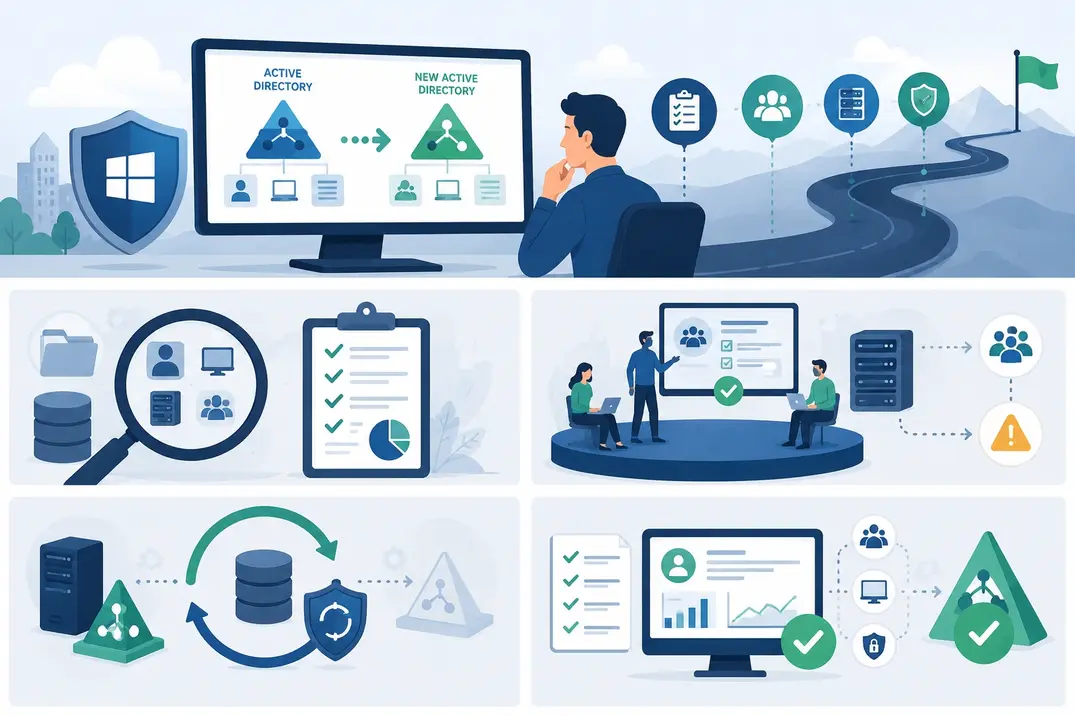
The call almost never comes on cutover night. It comes eleven days later, from someone in finance who cannot open a folder she has opened every morning for six years. Nothing failed at 2 a.m. Nothing showed up in the migration report. A permission somewhere was tied to a group that no longer resolves the way it used to, and it took a week and a half for anyone to notice.
That is the shape of most Active Directory migration problems. Not a dramatic outage, but a slow drip of small breakages in places nobody thought to test, discovered by users rather than by monitoring, at exactly the point when the project team has already moved on.
Reducing that risk is less about the migration night itself and more about everything that happens in the six to twelve weeks before it. What follows is how to structure that work.
Why Directory Changes Reach Further Than You Expect
Active Directory Domain Services is not a login system with some extras bolted on. It is the thing that answers “who is this and what are they allowed to touch” for most of a Windows estate. File shares, print queues, VPN concentrators, SQL logins, line-of-business apps, backup agents, monitoring tools, and the scheduled task nobody has looked at since 2019 all ask it that question.
So a change to the directory is not a change to logins. It touches:
- User, admin, and service accounts
- Workstations, servers, and domain membership
- Group memberships and nested group structures
- Group Policy objects and security baselines
- NTFS and share permissions
- DNS zones and name resolution
- Application authentication and authorization
- Remote access and conditional access rules
- Certificate templates and enrollment
There is also a detail that surprises teams the first time through. When an account moves to a new domain, it gets a new security identifier. Permissions on the old resources were granted to the old SID, not to the username. Migration tools handle this by writing the previous value into the SID history attribute so the account keeps its access without anyone re-permissioning thousands of folders by hand. That mechanism works well, right up until SID filtering on a trust quietly strips those values in transit and access disappears for reasons that look, from the user’s side, completely random.
Understanding that one interaction explains a large share of post-migration tickets.
Start By Finding Out What You Actually Have

Every migration plan begins with an inventory, and every inventory turns out to be incomplete. Plan for that.
Catalog the obvious things first: domains, domain controllers, functional levels, trusts, sites, users, groups, computers, servers, and Group Policy objects. Then go looking for the things that do not appear in any admin console. Scheduled tasks running under named accounts. Applications with a domain name compiled into a config file. Service accounts whose passwords are set never to expire and whose owners left the company. Shares with permissions granted directly to individual users instead of groups.
A useful exercise: pick five business-critical processes and trace them end to end, from the user clicking an icon to the data landing on disk. Write down every authentication hop. You will find dependencies that no automated discovery tool surfaced, because they exist in configuration rather than in the directory.
The point of the assessment is not a tidy spreadsheet. It is a list of things that could break, ranked by how loudly someone would complain.
Be Specific About Why You Are Doing This
“Modernize the environment” is not an objective. It is a budget line.
The real reason shapes every downstream decision. Consolidating six domains after a decade of acquisitions is a different project from separating one business unit ahead of a divestiture, which is different again from collapsing a legacy forest so you can get onto a supported functional level. Each one implies a different tolerance for downtime, a different cutover sequence, and a different answer to the question of what you carry across versus what you rebuild.
Write the objective in one sentence, get it agreed by whoever is funding the work, and use it to settle arguments later. When someone asks whether a fifteen-year-old print server needs to come along, the objective should answer it.
Dependencies Are the Whole Game
If a migration goes badly, the post-mortem almost always says the same thing: we did not know that depended on this.
Work through these questions before a single account moves:
- Which applications authenticate against the directory, and by which protocol?
- Which servers rely on domain membership for anything beyond login?
- Which scheduled jobs, batch processes, or integrations run as a domain account?
- Which groups gate access to money, customer data, or production systems?
- Where are usernames, group names, or domain names hard-coded into configuration?
- Which users work remotely, and what does their access path actually traverse?
- What breaks if a certificate issued by the old certificate authority stops being trusted?
Service accounts deserve their own pass. They are the most commonly missed dependency and the most disruptive when they break, partly because they fail silently. A migration is a reasonable moment to move suitable ones onto group-managed service accounts, where Windows handles password rotation instead of an administrator remembering to. That converts a recurring operational risk into a one-time piece of migration work.
Move in Waves, Not All at Once
Big-bang cutovers are appealing because they end quickly. They also concentrate every unknown into a single night with no room to react.
A phased sequence gives you somewhere to fail cheaply:
- Assessment and discovery
- Design and tooling setup
- Pilot migration
- Testing and remediation
- First production wave
- Remaining waves
- Validation, cleanup, and decommissioning
Most teams use Microsoft’s Active Directory Migration Tool for the object moves and security translation, sometimes alongside commercial tooling for the parts ADMT handles less gracefully. Whatever you choose, install and rehearse it well before wave one. Tooling problems discovered during a maintenance window are expensive.
Pick a Pilot Group That Can Actually Break Things
A pilot made up of IT staff and a few cooperative volunteers will tell you that logins work. That is not the information you need.
Build the group deliberately: someone in finance who lives in a legacy application, a field engineer who connects over VPN from a hotel, a designer with a mapped drive full of large files, an executive assistant with delegated mailbox access, an administrator with elevated rights, and at least one person who uses a shared workstation.
Then test the full working day rather than the login screen. Opening the applications they actually use. Reaching the shares they actually need. Printing to the device by their desk and connecting remotely and accessing the intranet site with integrated authentication and running the month-end report.
If something fails here, you have found it with twelve users affected instead of twelve hundred.
Legacy Applications Are Where Schedules Slip
Modern applications generally survive a directory change without much drama. Older ones are the problem, and the problem is rarely the application itself. It is that the application was configured once, by someone who has left, in a way nobody documented.
Watch for software that authenticates against a specific domain controller by name, references a NetBIOS domain name that is about to change, relies on a local group whose membership was set manually, or expects an account with a permission granted at installation and never reviewed since.
This gets harder in technically dense environments. A software company or game studio might be running source control, build agents, artifact repositories, license servers, render nodes, test harnesses, and cloud services that each authenticate differently. Build infrastructure is particularly unforgiving, because a broken build pipeline stops the whole team rather than inconveniencing one person.
Identify these systems early and test them individually. Some will need reconfiguration rather than migration, and that work takes longer than moving accounts.
Bringing in Outside Help
Directory migration is a specialty. Most internal teams do one every seven or eight years, which is not often enough to build real fluency, and the consequences of getting it wrong are visible to everyone in the business.
Working with Expert Active Directory migration solutions providers gives you people who have run the same scenario many times and know where it usually goes wrong. Just as valuably, an external team will ask uncomfortable questions about the current environment that internal staff have stopped noticing, because familiarity makes accumulated oddities feel normal.
If you do bring in help, insist on knowledge transfer as a deliverable rather than an afterthought. You want to own the environment afterward, not the consultant’s phone number.
Back Up Like You Expect to Restore
Backups for a directory migration are a different discipline from ordinary backups, and one detail catches people out. An Active Directory backup older than the tombstone lifetime is unusable for restore purposes, because objects deleted beyond that window are no longer valid. Microsoft’s own guidance on backing up and restoring domain controllers is explicit about keeping backup age inside that boundary and about protecting more than one writable domain controller per domain.
Take system state backups of multiple domain controllers, confirm they are inside the tombstone window, and document the current configuration in a form a stranger could follow at 3 a.m.
Then restore one. Not in theory, not by reading the runbook aloud, but by actually recovering to an isolated environment and checking it comes up clean. NIST’s contingency planning guidance makes the same point across every system type: a recovery capability that has not been exercised is an assumption, not a control. An untested backup is a story you tell yourself about being prepared.
Write the Rollback Plan Before You Need It
Every plan should answer one question in writing, in advance: what do we do if this goes wrong?
A usable rollback plan names the conditions that trigger it, the person authorized to call it, the systems that can be reverted and the ones that cannot, the expected time to return to the previous state, and what users will be told. Vagueness in any of these turns a bad night into a worse one, because the decision gets made by whoever is most tired and most confident.
Note that “cannot be reverted” is a legitimate answer for some components, and it is far better to know that beforehand. For the worst cases, Microsoft maintains a detailed forest recovery guide that is worth reading during planning rather than during an incident. Rehearse the rollback during the pilot, when the stakes are small enough to learn from.
Tell People What Is Happening
Communication is not a soft add-on to the technical plan. It is the difference between a help desk handling forty tickets and four hundred.
Tell users what will change, when, and what they need to do. Keep it short and specific: sign in with this format, expect one password reset, reconnect the VPN once, your drive letters stay the same. Send it close enough to the event that people remember, and again on the morning itself.
Resist the urge to explain the architecture. Nobody outside IT needs to know what a forest trust is, and telling them creates anxiety rather than understanding.
Test Permissions in Both Directions
Migrations create two kinds of permission failure, and teams reliably test for only one.
The first is under-permissioning: someone cannot reach what they need. It surfaces fast because people complain.
The second is over-permissioning: someone can now reach things they should not. Nobody reports this. It sits there silently, and it is the more serious of the two, because migrations have a tendency to flatten nested group structures and translate permissions generously in the name of avoiding breakage.
Check group memberships, file and share permissions, administrative group membership, application entitlements, service account rights, Group Policy application, and remote access rules. Verify with privileged accounts as well as standard ones. The joint guidance from CISA and international partners on detecting and mitigating Active Directory compromises is a good reference for what attackers look for in exactly this kind of loosened configuration, and a migration window is when those weaknesses tend to be introduced.
Clean up SID history once resource access no longer depends on it. Leaving it in place indefinitely is a standing risk.
The Weeks After Cutover Matter More Than the Night Itself
Users logging in successfully is the start of the validation period, not the end of it.
Watch authentication failures, account lockouts, Group Policy processing errors, application event logs, replication health, DNS resolution, and help desk volume by category. Compare against a pre-migration baseline, which means capturing that baseline beforehand.
Also talk to people. Automated monitoring catches systems failing. It does not catch the workaround someone quietly invented because a process now takes four extra clicks, and those workarounds are where the next problem grows.
Keep the migration team engaged for at least two to four weeks after the final wave. Disbanding at cutover is how the eleven-day phone call ends up going to someone who has no context.
Leave the Old Environment Behind
A migration is the one moment when an organization has both permission and momentum to clean house.
You will find dormant accounts, groups whose purpose nobody can explain, computer objects for hardware that was recycled years ago, and service accounts running nothing at all. Moving all of it across preserves the mess and doubles the work, because now you have to maintain it in a directory you were supposed to be simplifying.
Set a rule before the assessment starts: anything that a named owner cannot justify does not migrate. Disable rather than delete, wait out an agreed period, then remove. That gives you a safety net without carrying dead weight into the new environment.
Know What Success Looks Like
Define the measures before you start, or you will end up arguing about whether the project went well based on how tired everyone feels.
Reasonable ones include the percentage of objects migrated successfully on the first attempt, authentication success rate against baseline, number of applications requiring post-migration remediation, help desk ticket volume and how quickly it returns to normal, unplanned downtime against the agreed window, permission audit exceptions, security incidents during the migration period, and whether rollback was invoked at all.
Collect them, write them down, and keep the record. The next migration team will be grateful, and there is always a next migration.
Final Thoughts
Low-risk Active Directory migration is not a matter of better tools or faster execution. It comes from knowing the environment properly, mapping dependencies before touching anything, testing with a pilot group chosen to expose problems rather than confirm success, holding a recovery path you have actually rehearsed, and staying present long enough afterward to catch what testing missed.
Complex environments deserve more care, not more speed. The organizations that come through cleanly are rarely the ones that moved fastest. They are the ones that spent an unglamorous amount of time finding out what was really there before they changed it.