
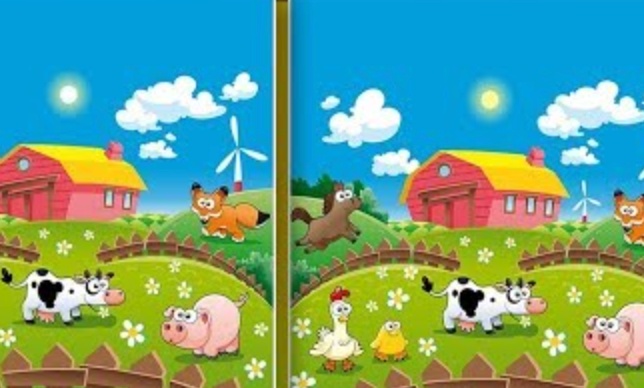
Find The Difference
Find The Difference is a casual observation puzzle game where you compare two similar images and identify the small changes between them. The challenge is not based on speed or complex controls but on careful attention to details such as missing objects, changed colors, different positions, and altered shapes.
The game is designed for short relaxing sessions and helps test visual memory and concentration. Each level gives you two pictures that appear almost identical, but several hidden differences are waiting to be found.
Find The Difference is a casual observation puzzle game where you compare two similar images and identify the small changes between them. The challenge is not based on speed or complex controls but on careful attention to details such as missing objects, changed colors, different positions, and altered shapes.
The game is designed for short relaxing sessions and helps test visual memory and concentration. Each level gives you two pictures that appear almost identical, but several hidden differences are waiting to be found.
| Detail | Information |
|---|---|
| Genre | Puzzle, Observation, Casual |
| Main Mechanic | Image Comparison |
| Difficulty | Increasing Levels |
| Mode | Single Player |
| Platforms | Desktop, Mobile, Tablet |
| Technology | HTML5 |
For more puzzle experiences, visit Mopoga’s Puzzle games section.
About Find The Difference
The main objective is simple: study both images and tap or click the areas that do not match.
Differences can appear anywhere in the scene. Some are easy to notice, while others are placed in smaller details that require a slower look.
Common changes include:
- Missing objects
- Different colors
- Changed patterns
- Extra items
- Removed details
- Position changes
The game rewards patience more than random clicking. Looking carefully at one section at a time is usually more effective than quickly scanning the entire image.
Players who enjoy visual challenges may also like Jigsaw Surprise, which focuses on assembling pictures instead of comparing them.
How To Play Find The Difference
Each level presents two images side by side.
A good approach is:
- Start by comparing large objects first.
- Check the background and corners.
- Look for changes in colors and shapes.
- Compare small details carefully.
- Click or tap when you are confident about a difference.
- Continue until all differences are discovered.
Avoid clicking randomly. Many versions of this type of game limit mistakes, so unnecessary guesses can make the level harder.
A useful method is dividing the image into sections:
- Top area
- Middle area
- Bottom area
- Left and right sides
This keeps your search organised and reduces the chance of missing small changes.
Observation Tips
The hardest differences are usually not the biggest objects. They are often small details that your brain automatically ignores.
Pay attention to:
- Repeated patterns
- Object shapes
- Number of items
- Shadows
- Small decorations
- Background elements
If you cannot find the final difference, stop looking at the whole picture and focus on one small area at a time.
For another game based around finding and recognising objects, try Word Search.
Controls
| Control | Action |
|---|---|
| Left Mouse Button | Select differences |
| Touchscreen | Tap differences on mobile |
Find The Difference is a simple puzzle that rewards focus and careful thinking. Instead of rushing through levels, slow down, compare each area properly, and train your eye to notice the details that are easy to overlook.
Related products

Reviews
There are no reviews yet.