
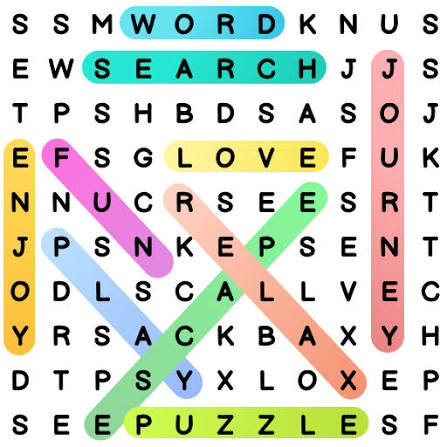
Word Search
Word Search is a classic puzzle where you scan a letter grid to find hidden words in different directions before time runs out.
Word Search is a classic letter-grid puzzle where you find hidden words before the timer runs out. Words can appear horizontally, vertically, diagonally, forwards, or backwards, so the challenge is less about knowing difficult vocabulary and more about scanning the board carefully.
The game was developed by Code This Lab, a studio that creates cross-platform browser and casual games. You can learn more about the developer through the official Code This Lab website. Players who enjoy simple word puzzles can also browse Mopoga’s Puzzle games.
Word Search Game Details
| Detail | Information |
| Developer | Code This Lab |
| Detailed Release Listing | December 2017 |
| Current Metadata Listing | February 2019 |
| Technology | HTML5 |
| Languages | 6 |
| Categories | 6 themes |
| Platforms | Desktop, mobile, tablet |
| Orientation | Portrait |
| Desktop Control | Left mouse button |
| Mobile Control | Swipe |
The reference page contains two release records: its detailed section lists December 2017, while the current metadata shows February 2019. Both are worth keeping separate rather than guessing which publication date replaced the other.
How To Play Word Search
Start by choosing one of six languages: English, German, Italian, French, Spanish, or Portuguese. Then choose a theme such as animals, fruits, countries, computers, vegetables, or music.
A list of words appears above the scrambled letter grid. Find each listed word and drag across all its letters. On mobile, swipe across the word instead.
A correct selection is automatically marked. Make sure your drag reaches the complete final letter because stopping halfway can cause the selection to fail.
Words may run in any straight direction, including backwards and diagonally. If you are stuck looking for a word from left to right, search for the same letters in reverse.
For a different language challenge, Popular Words asks you to predict common answers instead of finding hidden letters.
Useful Word Search Tips
Randomly moving your eyes around the board wastes time. Pick the first letter of one target word and scan each row until you find possible starting points. From there, check every direction.
Unusual letters such as Q, X, and Z are useful visual anchors because they stand out among common letters. Double-letter combinations can help for the same reason.
The game has no hints, boosts, or special abilities, so observation is the main skill. Word-search activities are also used in vocabulary exercises by organisations such as the British Council, while the Cambridge Dictionary can help when you meet an unfamiliar word.
If you prefer slower board planning, try 2048. You can also check Mopoga’s Casual games or wider Games collection for more quick browser games.
Word Search works because it keeps the familiar newspaper puzzle intact: no unnecessary progression system, just a grid, a word list, a timer, and the satisfaction of finally spotting the word that was sitting backwards in front of you.
Related products



Reviews
There are no reviews yet.