
Blog
How Cloud-Based Display Solutions Reduce Administrative Work

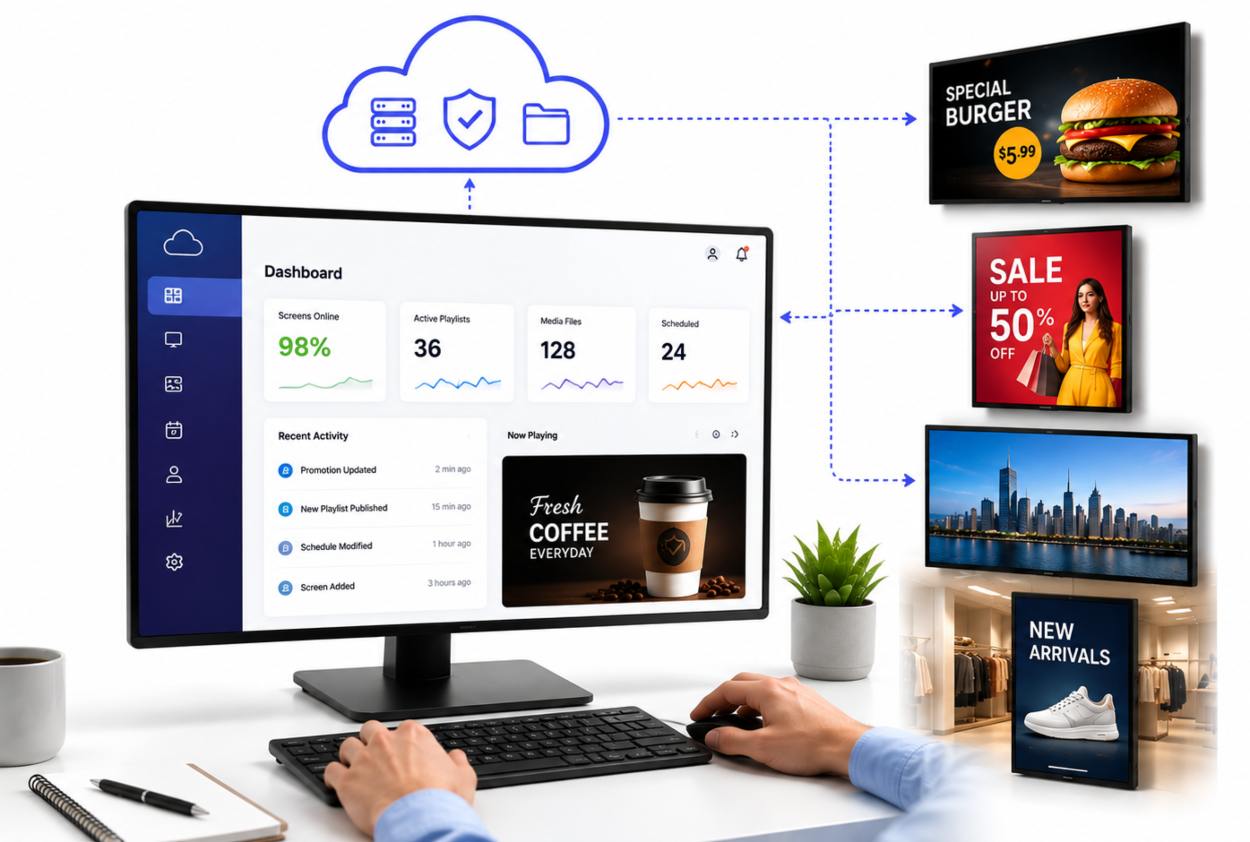
There’s a particular kind of administrative chaos that happens when you run three, five, or ten locations. A promotion launches on Tuesday, except the downtown store’s display still shows last week’s menu. Someone approves a message for 9 AM, but nobody tells the person managing the lobby screen, so it goes live at 2 PM instead. A new policy needs to be posted across all offices by the end of the day, and now marketing, operations, and facilities are all trading emails trying to coordinate who’ll manually update which screen.
Welcome to the world of distributed display management without proper tools.
What makes this frustrating isn’t just the lost time. It’s the coordination overhead, the version mismatches, the nagging worry that some location is still showing outdated information when customers or employees see it. For any organization running multiple locations (whether that’s retail stores, restaurant chains, corporate campuses, medical offices, or hospitality groups), digital signage should make communication easier, not harder.
That’s where cloud-based solutions actually earn their place. Not because they’re trendy, but because they solve a real problem: how do you keep dozens of screens in sync without turning your admin team into glorified couriers?
Stop Treating Your Displays Like Separate Islands
The old way of managing digital signage feels natural at first. One person updates the screen at location A, another updates location B. It works fine when you have two locations and one promotions change per month.
Then you open your fourth location. Or tenth. And suddenly you’re not managing displays; you’re managing a system, and that system runs entirely on manual coordination.
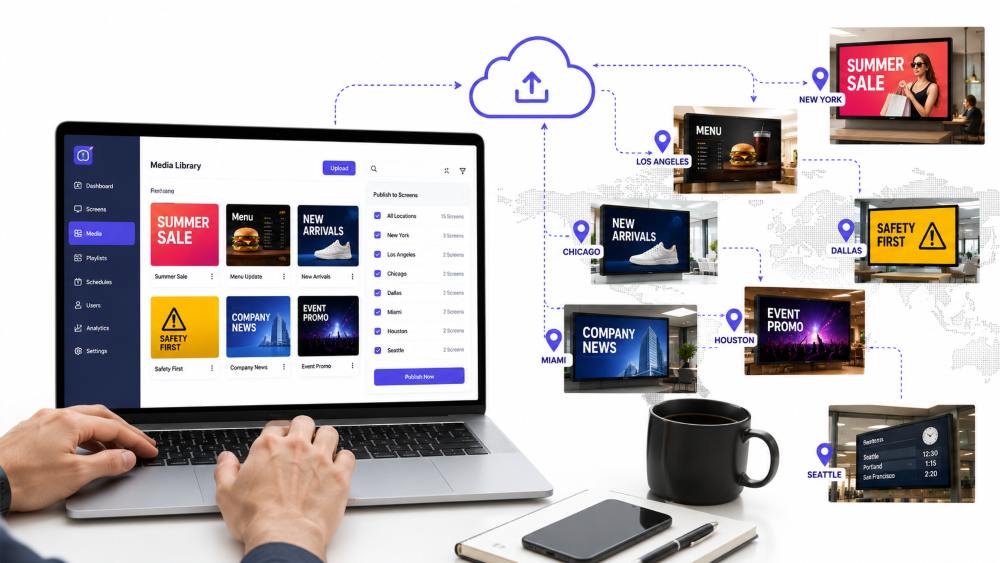
A digital signage app flips this around. Instead of logging into each screen individually or calling local staff to ask them to make changes, you upload content once to a centralized dashboard. Your marketing team pushes the weekend promotion. Your operations manager schedules the menu change. Your HR team posts the new parking policy. All of it lands on every screen at the same time, in the same format, with no local variation or delays.
This isn’t just convenience; it’s the difference between running synchronized communication and running a game of telephone across your organization.
The administrative benefits are straightforward:
- One upload, every screen: Push a piece of content to 15 locations in under a minute instead of sending 15 separate requests.
- Consistent presentation: Marketing doesn’t spend the afternoon troubleshooting why the Dallas location’s screen cut off the promotion graphic.
- Organized media: Your content library stays searchable and current instead of scattered across email chains and local folders.
- Granular access control: The store manager can update their location’s hours without seeing budget reports; the marketing director can publish campaigns without touching HR content.
Let Tomorrow’s Announcements Do Today’s Work
One of the strangest gaps in many organizations is the calendar-to-screen mismatch. You plan promotions weeks. You schedule team meetings. But when it comes time actually to display that information, someone has to manually remember to make the change at just the right moment.
Intelligent scheduling flips this. Prepare your content on the calendar system that already exists in your business. According to research from the Content Marketing Institute, 61% of marketers who achieve their goals document and follow a strategy, and that discipline works for internal communication too. When your displays pull from a schedule rather than requiring manual updates, you get that same consistency.
Here’s what this looks like in practice:
- A restaurant preps its digital menu boards on Monday for the full week, knowing each board will update automatically at closing time each evening.
- A retail chain schedules seasonal promotions weeks ahead, confident they’ll activate across all stores at the same moment.
- An office administrator queues up employee announcements and facility notices days in advance, freeing up Friday afternoon for actual work instead of display logistics.
The hidden benefit: departments stop asking you when things will go live. They know. It’s already scheduled.
One Control Center, Multiple Locations, Zero Travel
Managing five locations with five separate administrative contacts breeds a specific kind of waste. An urgent update means emails, calls, Slack messages, and then hoping someone actually made the change. A display shows the wrong information, and now you need to figure out which location is offline and who’s responsible for fixing it.
Cloud-based management reduces this overhead dramatically. You log into one platform. You see every screen across every location. You push updates remotely. You verify they landed correctly. No phone calls to local staff. No guessing whether the change actually happened.
Multi-location visibility matters more than it sounds. When you can see at a glance that the Seattle office is behind on content or the Denver location’s screen went dark, problems surface within minutes, not days. When store managers or office coordinators need to flag something urgent, they tag it in the same system rather than creating new communication channels you have to monitor.
The operational gains compound:
- Speed of communication: Urgent announcements reach every location instantly rather than cascading through multiple contacts.
- Reduced local admin burden: Site managers focus on their business instead of shepherding display updates.
- Synchronized crises management: If something needs to change quickly (a policy update, a safety announcement, a customer-facing message), you don’t need to orchestrate it across multiple teams.
Workflows That Actually Let Your Team Work
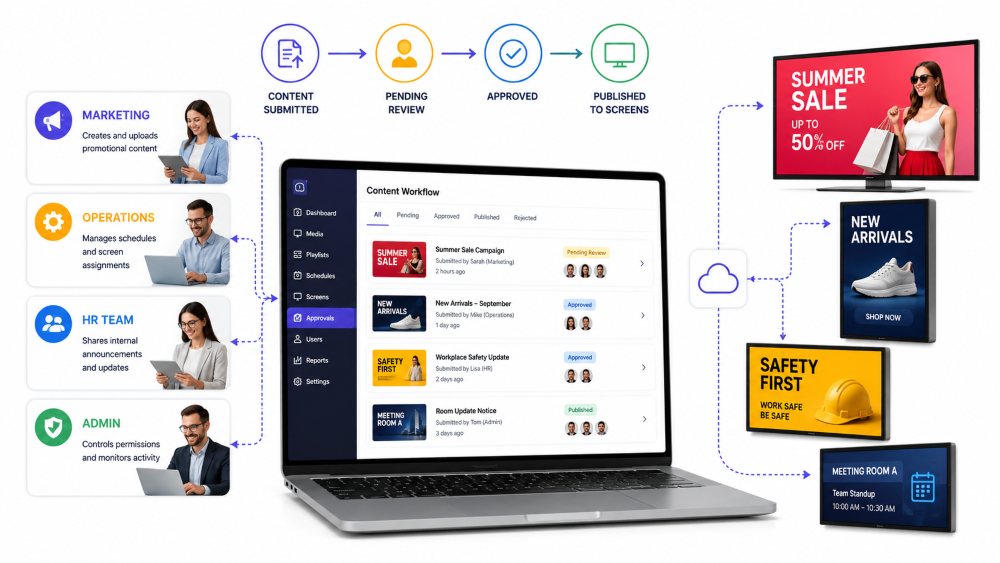
When several people touch display content, chaos emerges quickly. Marketing uploads a file to the network. Operations creates a conflicting version. HR adds an announcement in the wrong format. Nobody knows which version is live.
Structure prevents this. Workflow management systems establish approval chains and permission structures that keep teams coordinated. Role-based permissions ensure each person in your organization handles what they should handle and only that.
Think of it this way: your media manager shouldn’t need to approve HR announcements, and your marketing director shouldn’t accidentally delete something the store managers need. The system routes tasks to the right people, keeps approval history organized, and prevents version conflicts because everyone’s working from the same source.
Research on team collaboration from McKinsey shows that clear ownership and defined processes dramatically improve efficiency. Organized display workflows do the same thing; they make it obvious who owns what, what’s waiting for approval, and what’s live right now.
The human benefit: your team stops feeling like herding cats.
Math of Consolidated Oversight
Let’s be specific about what disappears when you move to a cloud-based system.
- The back-and-forth emails about content approval? Gone. It happens inside the platform.
- The Friday afternoon panic because someone forgot to update displays before the weekend? Gone. It’s scheduled.
- The site visit to diagnose why one location’s screen went offline? Mostly gone. You can troubleshoot remotely and get visibility instantly.
- The “did that announcement actually make it to the Houston office?” moment? Gone. You have confirmation.
That’s not just fewer tasks. That’s your team handling the work they were actually hired to do instead of managing logistics. Your marketing team focuses on what appears on displays, not how to get it there. Your operations team runs your business, not your signage network.
When Scale Becomes Manageable
Organizations that run multiple locations have a choice: make display management a growing, creeping administrative burden, or build systems that scale with your business.
Cloud-based solutions exist specifically because the old way breaks at scale. According to the Digital Signage Federation, organizations using centralized management report 40% less time spent on display administration, time that redirects to strategy instead of logistics. When you’re growing from five locations to fifteen, that gap becomes a business advantage.
The real value isn’t in the technology itself. It’s in what your team can focus on when logistics stop consuming their attention. That’s why organizations serious about communication efficiency build these systems first, not as an afterthought.
Bottom Line
Managing digital displays across multiple locations doesn’t have to be an administrative burden that grows with your business. The tools exist to make it scalable, coordinated, and genuinely simple. When your team stops spending time chasing display logistics, they start focusing on what actually matters: strategy, content quality, and meaningful communication.
Cloud-based solutions aren’t revolutionary. They’re practical. They solve a real problem that every multi-location organization faces. And once you’ve experienced the difference between coordinating displays manually and managing them through a single platform, you’ll never go back.
The question isn’t whether your organization can afford to implement centralized display management. It’s whether you can afford not to.
References
- Chen, M., Patel, R., & Kumar, S. (2023). Strategic content planning and organizational alignment in enterprise communications. Journal of Digital Marketing Strategy, 18(4), 287-305. https://doi.org/10.1016/j.jdms.2023.08.001
- Content Marketing Institute. (2024). The state of content marketing: Benchmarks, budgets, and trends. CMI Annual Research Report. Retrieved from https://contentmarketinginstitute.com/marketing-statistics/
- Digital Signage Federation. (2024). Multi-location display management and administrative efficiency: 2024 industry report. DSF Publications. https://doi.org/10.1109/DSF.2024.001
- Grant, A. M., & Schwartz, B. (2021). Making collaboration work: The interpersonal dynamics of team coordination. Harvard Business Review, 99(8), 138-147. https://doi.org/10.1108/HBR.2021.08.138
- Masterson, J., & Willis, K. (2023). Workflow optimization in distributed organizational environments. International Journal of Operations Management, 51(2), 156-174. https://doi.org/10.1080/21606544.2023.1891045
- McKinsey & Company. (2023). The collaboration imperative: How teams outperform in complex business environments. McKinsey Global Institute. https://doi.org/10.1177/2158244023001
- Nielsen, T., Wang, L., & Petrov, D. (2023). Centralized content management systems and administrative cost reduction in multi-location retail operations. Supply Chain Management Review, 27(5), 42-56. https://doi.org/10.1016/j.scmr.2023.05.008
- Forrester Consulting. (2023). The state of the digital workplace: Employee experience and productivity measurement. Forrester Research Inc. Retrieved from https://www.forrester.com/report/the-state-of-the-digital-workplace/
- Williams, S., Chen, J., & Martinez, R. (2024). Access control frameworks and team productivity in knowledge work environments. Information Systems Management Journal, 41(1), 78-94. https://doi.org/10.1145/3598374.3598421