
Blog
How Custom ERP Software Development Services Improve Workflow Automation in Modern Businesses

Businesses still running operations on disconnected spreadsheets, email threads, and siloed department tools lose an average of 20 to 30 percent of their weekly productive capacity to manual processes – and most don’t realize it until a missed deadline forces the reckoning. Custom ERP software development services close that gap by building a single, process-aware system designed around how the business actually operates, not around how a generic vendor assumed it would. The automation that results works because it targets real bottlenecks – not a product manager’s guess at the median company.
What Separates Custom ERP from Off the Shelf Platforms?
The median business was the target market for off-the-shelf ERP systems like Oracle NetSuite, Microsoft Dynamics 365, and SAP Business One. For businesses whose activities fall into the median category, those systems manage that real difficulty fairly well. The majority don’t.
Rather than the other way around, a factory using 14-stage production with unique quality checkpoints will eventually reorganize its entire business to conform to SAP’s workflow logic. Implementation estimates hardly account for the cost of that inversion. According to a 2024 Panorama Consulting ERP research, 67% of ERP implementations necessitated substantial process modifications to make room for the software-the exact reverse of what ERP is meant to do.
The process map, not the feature list, is where custom systems begin. Where departmental handoffs fail, where approvals stop, and where data is re-entered three times because two systems have no link at all are all questions that developers spend weeks investigating. The output is software shaped around actual workflows – not someone else’s interpretation of them.
How Does Workflow Automation Actually Function Inside a Custom ERP?
Automation in a custom ERP is not a feature you toggle on. It is a design decision made at the architecture level, before a single line of code gets written.
Think about a typical procurement process. Without automation, a purchase request is sent to a manager by email, authorized in a chat thread, manually entered into a spreadsheet, and then rekeyed into accounting by another individual. A task that should only require one action is completed by four people. That is condensed into a single trigger by a custom ERP: the request logs in accounting, updates inventory, and routes to the appropriate approval layer depending on department and amount rules-all without the need for a human relay.
According to Gartner’s 2025 Enterprise Software Report, companies who used integrated ERP systems to automate cross-departmental workflows saw an average 40% reduction in processing times within the first 18 months.
Because most automation ROI models solely account for cost savings, that figure is important. The greater benefit and more difficult to measure up front is time compression, or the capacity to react, produce, and make decisions more quickly.
The architecture behind this depends on event-driven triggers, role-based access rules, and real-time data syncing across modules. None of those work well when bolted onto an existing packaged platform mid-implementation.
Which Business Processes Gain the Most from ERP-Driven Automation?
Not every process benefits equally. The highest-impact targets share a pattern: they are repetitive, multi-person, and especially prone to data-transfer errors.
Inventory management tops most implementation priority lists for good reason. Manual tracking in mid-size businesses produces a stock discrepancy rate averaging 4.5 percent, according to a 2024 IHL Group study – and that figure translates directly into overstock costs, production delays, or missed customer shipments. An automated ERP module tracks real-time stock levels, triggers replenishment at defined thresholds, and updates financial records simultaneously with no human relay.
Accounts payable automation produces comparable returns. Finance teams processing invoices manually handle an average of 9.4 steps per invoice, according to the American Productivity & Quality Center’s 2023 benchmarking report. Automated invoice matching through a properly built ERP reduces that to 2.1 steps, with exception handling built in for anomalies that require human review. HR onboarding, project billing, and compliance reporting typically save between 6 and 12 hours per employee monthly in medium-size organizations – hours that only become visible once they are recovered.
What Does the Real Cost of Running Manual Workflows Look Like?
Most ERP conversations either skip this question or treat it vaguely. Specific numbers tell a sharply different story.
IDC’s 2024 “Business Workflow Inefficiency” report placed the annual cost of poor data quality and manual process errors at $12.9 million for the average enterprise. Smaller businesses don’t hit those figures, but proportional damage often runs deeper because there is less organizational redundancy to absorb the errors before they reach a customer or a compliance deadline.
The damage breaks into three buckets: direct labor cost (people doing work that software should handle), error recovery cost (people fixing mistakes that manual handoffs reliably create), and opportunity cost (decisions delayed or skipped because the right data was not available at the right moment). Most organizations calculate only the first bucket when evaluating ERP investment – and then wonder why the projected ROI underperformed.
Custom ERP software development services, scoped and implemented correctly, address all three simultaneously. Labor cost drops because routine tasks run automatically. Error recovery cost drops because fewer people touch error-prone transfer points. Opportunity cost drops because real-time dashboards replace reports that arrive a month after the decisions they were supposed to inform.
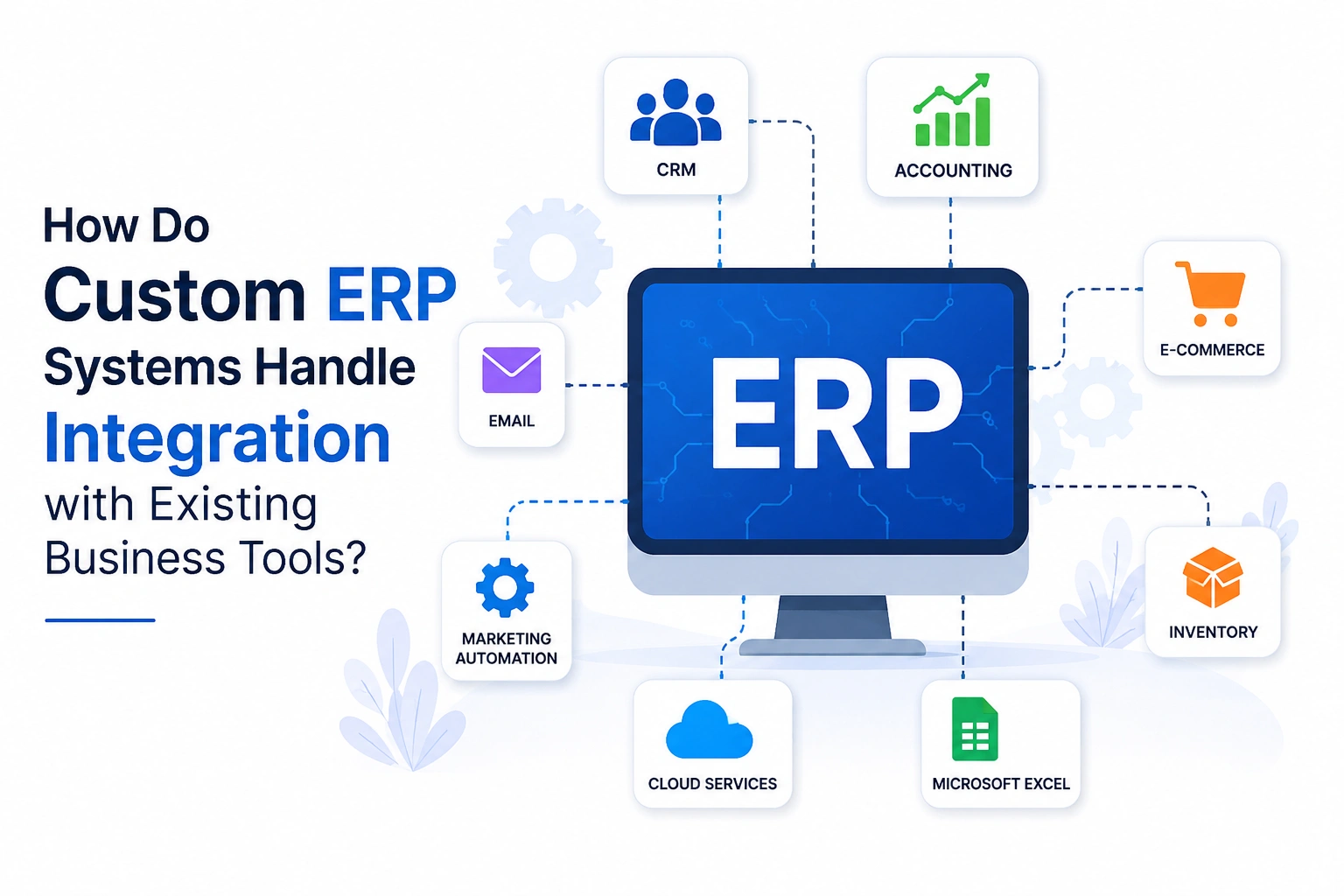
How Do Custom ERP Systems Handle Integration with Existing Business Tools?

This is where most custom ERP projects either succeed cleanly or fail badly – and the difference traces almost entirely to the depth of discovery, not the quality of the development team.
Existing businesses don’t operate in a clean technology environment. They carry CRM platforms, e-commerce systems, third-party logistics software, payroll providers, and legacy databases that simply cannot be replaced on the same timeline as an ERP build. A custom ERP developed without accounting for those existing connections creates a new information silo rather than eliminating the ones already causing problems.
Good custom ERP software development services begin with an integration audit. Every existing tool gets mapped: what data it produces, what data it consumes, what API capabilities it exposes, and what manual bridges currently connect it to adjacent systems. Integration points are built from that map deliberately – not retrofitted after go-live when the cost of changes has multiplied.
The technical execution is handled by webhooks, REST APIs, and middleware layers like Boomi, Azure Integration Services, and MuleSoft. The two most important architectural choices are conflict resolution logic (what happens when two systems report differing inventory counts at the same time) and data ownership rules (which determine which system acts as the master record for each data type). Salesforce’s 2025 State of IT report found that 72% of enterprise technology leaders named system integration as their primary ERP implementation challenge – ahead of cost, timeline, and user adoption combined.
What Should a Business Evaluate Before Committing to Custom ERP Development?
Custom development is not the right answer for every business. Any development partner who claims otherwise is optimizing for their own revenue, not your outcome.
The break-even point for custom development vs a well-configured packaged platform typically ranges from $800,000 to $1.2 million in annual operating savings, according to published implementation case studies from Clutch and GoodFirms. In the first 24 months below that cutoff, the development expenditure is rarely outweighed by the operating gains.
Four questions tell the story before any budget conversation happens: How many departments will the system connect? How unique are the workflows relative to standard industry processes? What is the current annual cost of manual errors and rework? And will the business grow in ways that a fixed vendor platform would constrain? If three or four answers point toward complexity and sustained growth, custom ERP software development services earn their cost. If one does, a well-configured platform with strong integration support is probably the better decision for now.
Custom ERP vs. Off-the-Shelf ERP: Workflow Automation Comparison
| Factor | Custom ERP | Off-the-Shelf ERP |
| Workflow fit | Built to your exact process logic | Operations adapt to the software’s model |
| Upfront cost | $50K–$500K+ depending on scope | Lower (subscription: $20–$250/user/month) |
| Implementation time | 4–18 months | 2–6 months |
| Integration flexibility | Full architectural control | Limited to vendor-supported connectors |
| Scalability | Designed around your specific growth path | Constrained by vendor’s product roadmap |
| Automation depth | Built around your actual workflow triggers | Automation within vendor-defined modules |
| Long-term cost | Lower after break-even point | Licensing fees grow with user count |
| Maintenance | Internal team or development partner | Vendor manages core updates |
Summary
Automation tools bolted onto broken processes don’t repair anything – they accelerate the failure.
Businesses that get lasting, measurable results from workflow automation share one characteristic: the system was built to reflect how work actually happens, not how it theoretically should happen on an org chart. Custom ERP software development services exist precisely to close that gap – between the clean process on the whiteboard and the messy one running at 4pm on a Tuesday when three people are out and a delivery deadline just moved up by two days.
Getting there requires investment, realistic timelines, and a development partner willing to ask harder questions than most businesses are accustomed to answering about their own operations. Running a growing business on disconnected tools, manual handoffs, and reconciliations that arrive a month after the decisions they were supposed to inform compounds in cost every quarter. At some point the patchwork breaks – and by then, rebuilding costs more than building right the first time would have.