
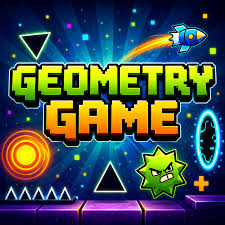
Geometry Game
Geometry Game is a rhythm-based 2D platformer where one small mistake can erase an otherwise perfect run. Your geometric character moves forward automatically, leaving you responsible for the part that matters most: deciding exactly when to jump, when to hold, and how to react when portals suddenly change the rules.
Geometry Game is a rhythm-based 2D platformer where one small mistake can erase an otherwise perfect run. Your geometric character moves forward automatically, leaving you responsible for the part that matters most: deciding exactly when to jump, when to hold, and how to react when portals suddenly change the rules.
The game is inspired by Geometry Dash and recreates that familiar mixture of music, spikes, gravity changes and instant restarts in a Scratch-made browser version. Controls are deliberately minimal, but that simplicity makes bad timing impossible to hide. When a jump fails, it is usually obvious that the input came a fraction too early or too late.
If that kind of short, demanding challenge appeals to you, Mopoga’s Arcade games collection has more games built around reaction time, repetition and improving one run at a time.
About Geometry Game
Geometry Game is a free side-scrolling rhythm platformer inspired by Geometry Dash, the game created by Robert Topala and RobTop Games.
The browser adaptation covered here was made in Scratch by Griffpatch. The reference page lists this browser version as released in May 2016 and identifies its game technology as HTML5.
That distinction matters because Geometry Game and the original Geometry Dash are related but are not exactly the same product.
The original commercial Geometry Dash was created by RobTop Games. Its official Google Play listing describes the familiar rhythm-based platforming, practice mode, gravity changes, level editor and one-touch gameplay.
The browser game on this page is instead based on Griffpatch’s Scratch recreation of those mechanics.
If mobile-friendly games are your priority, Mopoga’s Casual games collection includes Geometry Dash alongside other games suited to shorter browser sessions.
How To Play Geometry Game
Your square moves forward automatically.
You do not need to hold a movement button to make it travel through the level.
Instead, your job is to react to what approaches.
Press Space or the Up Arrow to jump.
Hold the button when repeated or continuous jumping is needed.
During vehicle sections, the controls change:
- Up Arrow steers upward
- Down Arrow steers downward
That is almost the entire control scheme.
The difficulty comes from applying those few inputs at the correct moment.
A typical sequence might involve:
- jumping over a spike
- landing on a narrow platform
- immediately jumping again
- entering a portal
- adapting to different gravity or movement
- passing another obstacle sequence
- crashing on the final spike and returning to the beginning
That last part happens often.
Crashing Means Starting Again
Touching a dangerous obstacle causes an immediate failure.
Typical hazards include:
- spikes
- walls
- dangerous surfaces
- badly timed portal sections
- obstacles encountered after gravity changes
There is no health bar that lets you survive several errors.
One collision is enough.
The run restarts from the beginning in normal play.
This can feel harsh when you have reached much farther than before, but it is also what gives a successful full run its value.
You are not trying to survive by accumulating enough health.
You are trying to make fewer mistakes.
Geometry Game Controls
Normal Movement
| Control | Action |
|---|---|
| Space | Jump |
| Up Arrow | Jump |
| Hold Space | Repeated or multi-jump movement where applicable |
| Hold Up Arrow | Repeated or multi-jump movement where applicable |
Vehicle Controls
| Control | Action |
|---|---|
| Up Arrow | Steer vehicle upward |
| Down Arrow | Steer vehicle downward |
The most important rule is simpler than the table:
Do not touch the spikes.
A collision sends you back to the start in normal mode.
Why Muscle Memory Becomes Important
Early attempts usually require conscious thought.
You see an obstacle.
You decide to jump.
You press.
After enough repetition, that process becomes much quicker.
The level starts feeling like a sequence your hands recognise.
That is muscle memory.
Practice Mode helps because it lets you repeat difficult sections enough times for those movements to become familiar.
The danger is practising an incorrect timing repeatedly.
If one section keeps failing the same way, changing the approach is more useful than simply repeating it faster.
Geometry Game History
The browser game comes from a much larger Geometry Dash history.
The original Geometry Dash was developed by Robert Topala, better known through RobTop Games.
The early project reportedly began without an elaborate final concept. It developed from a basic cube capable of jumping and crashing into a full rhythm platformer.
An early name was Geometry Jump.
The first commercial Geometry Dash launched with a much smaller level selection than the modern game.
The important date distinction is this:
- August 13, 2013 – original Geometry Dash launched on iOS and Android
- December 22, 2014 – Geometry Dash released on Steam for PC and Mac
- May 2016 – release date listed for the Geometry Game browser adaptation covered here
The official Geometry Dash Steam page still identifies RobTop Games as both developer and publisher and records the PC release as December 22, 2014.
This is why the May 2016 date should not be described as the original Geometry Dash launch.
It belongs to the browser adaptation’s listing.
The two should be understood as related rather than identical.
Geometry Game
- Scratch recreation
- made by Griffpatch
- browser-focused
- listed as a May 2016 release
- recreates Geometry Dash-style jumping and rhythm mechanics
Geometry Dash
- official RobTop Games title
- originally released in August 2013
- commercial mobile and desktop game
- has an extensive official level ecosystem
- includes a full editor and large community content system
That distinction helps avoid mixing features from one version into the other.
More Geometry-Style Games On Mopoga
The most obvious related title is Geometry Dash on Mopoga, which focuses directly on the rhythm-platform formula that inspired this Scratch version.
GDPS Editor is a better choice when level creation and custom Geometry Dash content are more interesting than simply completing a stage.
Dreadhead Parkour is worth trying for more deliberate 2D movement.
Level Devil suits players who enjoy learning through repeated mistakes.
Slope takes the same quick-restart mentality into a fast 3D environment.
Related products

Capybara Clicker 2



Snow Rider 3D
World’s Hardest Game
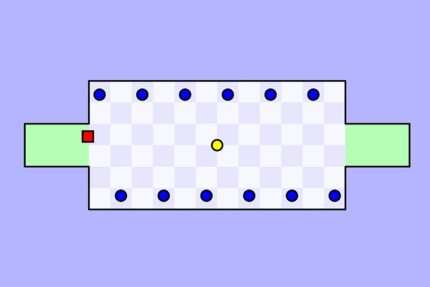
Worlds Hardest Game is a challenging puzzle platformer built around precision, timing, and patience. You control a small red square and must navigate through levels filled with moving obstacles, collect yellow coins, and reach the final area without touching blue enemies.
The game is known for its simple design but extremely demanding gameplay. There are no complicated controls or upgrades. The entire challenge comes from learning movement patterns, improving timing, and making fewer mistakes.
Reviews
There are no reviews yet.