
Blog
Invisible Characters in Gaming: A Small Trick That Can Change Your Username, Profile, and Chat Style

Gamers have always found creative ways to stand out. Some players use rare skins, limited-edition badges, custom controller layouts, animated profile pictures, or stylish usernames. Streamers polish their bios, esports players build sharp clan tags, and collectors often want their profiles to look as unique as their shelves.
One simple trick that has become popular across gaming spaces is using invisible characters. These characters look blank to the eye, but games, apps, and platforms still read them as real text. That makes them useful for usernames, profile spacing, clan tags, empty messages, and cleaner bio layouts.
Used properly, they can help a profile look different without relying on loud symbols or overused fancy fonts.
What Are Invisible Characters?
Invisible characters are Unicode characters that do not visibly appear on screen. The system still detects them, even though players cannot see them.
A common example is the Zero Width Space, known as U+200B. It does not show like a normal letter, number, or symbol, but it can still take up space in certain text fields.
This is why gamers use them in places where a platform does not allow a field to be completely blank. Instead of typing visible text, a player can paste an invisible character, and the system may accept it as valid input.
These characters are not limited to gaming. They also appear in social media names, profile bios, messaging apps, and design formatting. In gaming, however, they have become especially useful because identity and presentation matter so much.
Why Gamers Use Invisible Characters
Gaming profiles are no longer just simple account pages. They are part of a player’s identity.
A username can show personality. A clan tag can show loyalty. A streamer bio can guide viewers toward Twitch, YouTube, Discord, or TikTok. Even a small formatting trick can make a profile feel more polished.
Invisible characters give gamers another way to control how their text appears.
Creating a Cleaner or More Unique Username
Most gaming platforms do not allow a username field to stay blank. Some also reject names that are already taken.
Invisible characters can help in two ways.
First, they can make a name look different from a standard username. A player might use a normal visible name with a hidden character added before, after, or between letters. To other players, the name may look almost identical, but the system reads it as a different username.
Second, they can create a minimalist look. Some players prefer simple, quiet profiles to loud names full of numbers, symbols, and random letters. A blank-looking username can catch attention in a lobby because it feels unusual.
This works especially well in social gaming spaces where players notice names quickly, such as:
- Minecraft servers
- Roblox profiles
- Discord gaming communities
- Steam display names
- Battle royale lobbies
- Custom esports scrims
- Casual party chats
Gamers should still follow platform rules. Some games may block unusual formatting, and using hidden text to impersonate another player can lead to account problems.
Making Gaming Profiles Look More Professional
Streamers, creators, and esports fans often care about profile layout. A messy bio can make a profile look rushed, while clean spacing can make links, roles, and achievements easier to read.
The problem is that some platforms remove extra spaces after saving a profile. This can ruin a carefully arranged bio.
Invisible characters can help preserve spacing because the platform may treat the blank area as real content.
Example Profile Layout
A gaming bio might look like this:
- FPS Player
- Ranked Grinder
- Twitch and YouTube Clips
- Battle Royale, RPG, and Fighting Games
- Open for collabs
With invisible spacing, players can make sections breathe better and avoid everything looking squeezed together.
This is useful for:
- Streamers adding social links
- Esports players listing roles
- Clan leaders sharing recruitment info
- Gaming collectors showing their favorite franchises
- Content creators organizing profile sections
A clean profile can make a small creator look more serious, especially when viewers click through from clips, shorts, or tournament posts.
Sending Blank Messages in Gaming Chats
Invisible characters can also be used to send messages that appear empty.
This is mostly used as a fun chat trick. A friend might receive a notification, open the chat, and see nothing. In a group lobby, a blank message can make people stop and react.
It can work in:
- Discord servers
- Party chats
- In-game messages
- Social gaming apps
- Private clan chats
This should be used lightly. Spamming blank messages can annoy teammates, moderators, or viewers. In competitive spaces, chat should stay useful, especially during scrims, ranked matches, or tournament coordination.
Customizing Clan Tags and Team Names
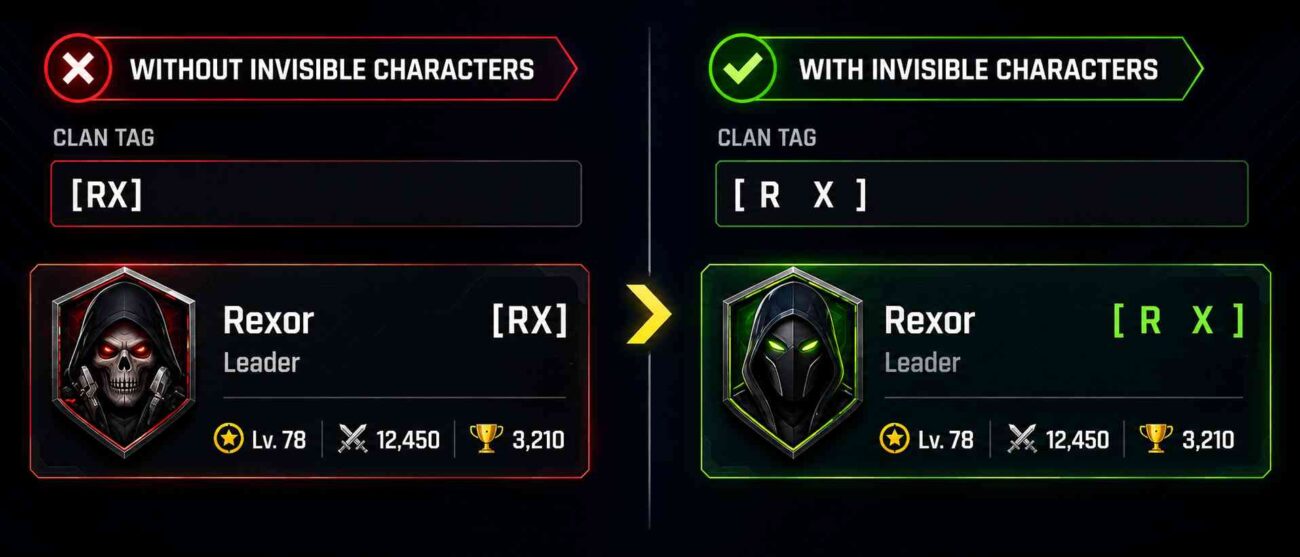
Clan tags are a big part of gaming culture. They show team identity in shooters, Survival games, racing games, and multiplayer communities.
Invisible characters can make a short clan tag look cleaner by adding hidden spacing around letters or symbols. For example, a team tag can feel more balanced when the spacing does not look cramped.
This can help with:
- Esports-style team branding
- Private Discord clans
- Ranked squads
- Minecraft factions
- GTA crews
- Call of Duty-style groups
- Mobile gaming teams
A small spacing change can make a tag look more Premium, especially when it appears beside a username in a kill feed, scoreboard, or lobby list.
Helping Players Stay More Private
Some gamers prefer not to share personal information online. That is reasonable, especially for younger players, streamers, and anyone who separates gaming from school, work, or real life.
Invisible characters can sometimes be used in optional fields where a platform asks for profile details the player does not want to display publicly.
For example, a player may not want to add:
- A real name
- A personal bio
- A location
- A public contact detail
- A social handle on every platform
Using hidden characters in non-essential fields can help keep a profile minimal. However, players should never use formatting tricks to bypass important safety rules, age checks, payment checks, or platform moderation.
Privacy is smart. Breaking platform terms is not.
How Streamers and Creators Can Use This Trick
For streamers, a profile is often a mini landing page. Viewers may check it after watching a clip, joining a live stream, or seeing a comment.
Invisible characters can help creators make profiles easier to scan. Clean spacing can separate links, roles, and calls to action.
Useful Creator Examples
A streamer could use better spacing to organize:
- Twitch link
- YouTube channel
- Discord server
- Business email
- Stream schedule
- Main games
- Collab note
A gaming collector could use it to format a profile around favorite series, such as Pokémon, Zelda, Final Fantasy, Halo, or PlayStation classics.
An esports fan page could use it to separate tournament updates, team tags, and match links.
The goal is not to hide information. The goal is to make a small profile space look cleaner.
How to Copy Invisible Characters
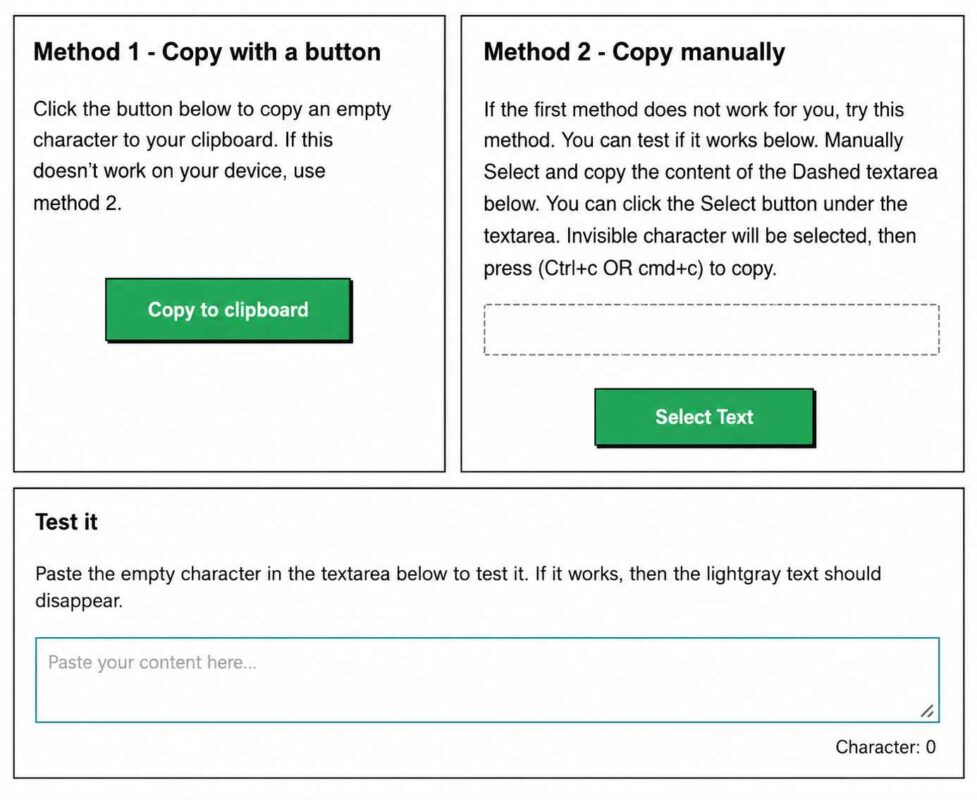
The manual way is to search for Unicode blank characters, such as Zero Width Space, and copy them from a Unicode reference page. That works, but it can be annoying because not every hidden character behaves the same across platforms.
A faster option is using an online tool that lets you copy an empty character with one click. This saves time because you can paste it directly into a username, bio, or message field and test whether the platform accepts it.
Before using it widely, test it on a single profile field or in a private message first. Some games remove hidden formatting, while others allow it.
Where Invisible Characters May Not Work
Invisible characters are useful, but they are not guaranteed to work everywhere.
Some platforms automatically remove them. Others may show a square box, question mark, or strange spacing. A few games may reject them completely during username creation.
Common Issues Gamers May Face
Invisible characters may fail when:
- The game filters unusual Unicode characters
- The platform trims blank space after saving
- The font does not support that character
- The chat system replaces hidden text
- The username system detects it as invalid
- The platform updates its moderation rules
That is why testing matters. What works on Discord may not work on Steam. What works in a profile bio may not work in a ranked game name.
Use Invisible Characters Responsibly
This trick is best used for style, spacing, privacy, and harmless fun. It should not be used to impersonate other players, circumvent moderation, unfairly confuse opponents, or harass people in chat.
Good uses include:
- Making a profile bio cleaner
- Creating a unique username style
- Adding subtle spacing to clan tags
- Sending a harmless blank message to a friend
- Keeping optional profile fields minimal
Bad uses include:
- Copying another player’s name to mislead people
- Hiding abusive text
- Spamming empty messages
- Dodging moderation
- Creating confusion during competitive matches
A smart gamer protects their account. If a platform says unusual formatting is not allowed, it is better to follow the rules.
Why This Trend Is Growing in Gaming
Gaming culture moves fast. A small trick can spread from one Discord server to a full community in days. Players see a blank name, unusual spacing, or a clean profile layout and want to try it themselves.
The trend is growing because it is simple. There is no software to install, no design skills needed, and no paid cosmetics required. It is copy and paste.
It also fits modern gaming style. Many players now prefer clean layouts, short usernames, minimal profiles, and subtle branding. Invisible characters match that look better than messy symbols or overloaded fonts.
For streamers, collectors, esports fans, and casual players, it is another small way to make a profile feel personal.
Final Thoughts
Invisible characters are a simple but clever formatting trick for gamers. They are hidden Unicode characters that systems still interpret as real text, making them useful for usernames, bios, clan tags, and blank chat messages.
They can help players create cleaner profiles, add hidden spacing, protect optional personal details, and stand out in lobbies or gaming communities. Streamers can use them to organize links, esports players can style team tags, and collectors can make their profiles look more polished.
The key is to use them responsibly. Keep it creative, avoid impersonation, and respect each platform’s rules. When used correctly, invisible characters are a small detail that can make a gaming profile feel sharper, cleaner, and more unique.