
Blog
Maintaining Subject Integrity: An Agency Workflow for Consistent AI Video

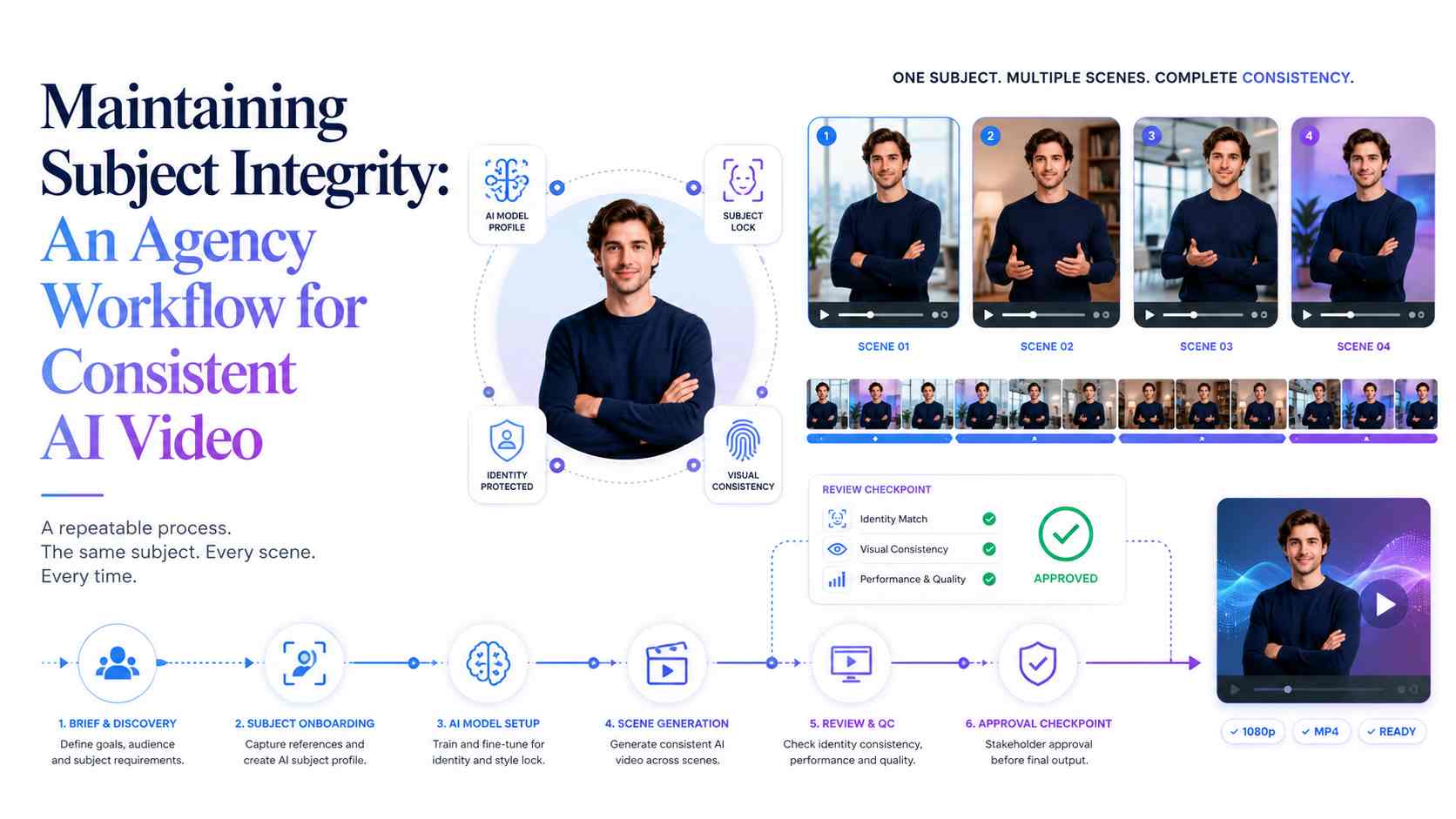
In professional video production and corporate video agency Singapore, continuity matters as much as visual quality. A 30-second commercial can look impressive in the first few seconds, but if the main character’s face, clothing, or body shape changes halfway through, the whole project starts to feel unfinished.
This is one of the biggest challenges agencies face when using generative video tools. The issue is often called identity drift. It happens when the same subject slowly changes from one shot to another. A face may become slightly wider, the eyes may look different, the jacket texture may change, or a hairstyle may shift between scenes.
For personal experiments, these small changes may not matter much. For client work, they matter a lot. Brands expect the same person, product, outfit, and mood to stay consistent throughout the full campaign. This is why agencies need a clear workflow instead of relying only on random text prompts.
Why Identity Drift Is a Serious Production Problem
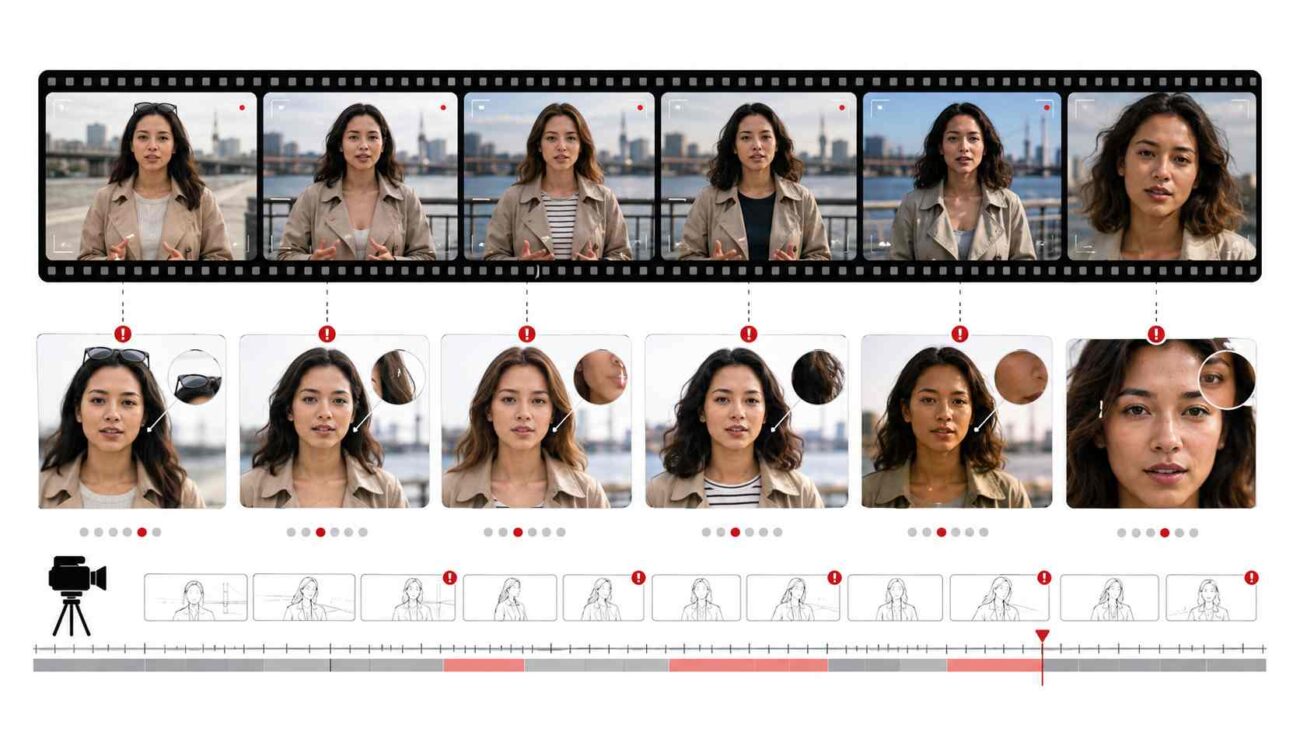
Identity drift is not just a small visual mistake. It affects trust, realism, and brand approval. When a client approves a storyboard, they expect the subject to remain visually stable from the opening shot to the final frame.
In traditional CGI, this problem is controlled with a fixed 3D model, rig, texture map, and lighting setup. Every shot is built around the same digital asset. Generative video works differently. The model creates motion and visuals based on prompts, image references, and learned patterns. This means the subject can change slightly every time a new clip is generated.
Common identity drift problems include:
- Facial structure changing between shots
- Hair shape or color shifting during movement
- Clothing patterns are becoming inconsistent
- Accessories disappearing or changing shape
- Skin tone changing under different lighting
- A close-up looking like a different person from the wide shot
- Logos, buttons, jewelry, or small details are becoming unstable
These issues become more visible when a project includes multiple camera angles, fast movement, close-up shots, or long scenes.
Why Text-to-Video Alone Is Not Reliable Enough
Text prompts are useful, but they are not enough for high-consistency commercial work. A prompt like “a middle-aged man with short black hair wearing a navy jacket” gives the model a general idea, but it does not define the exact face, nose shape, jawline, skin texture, or clothing detail.
Different models may interpret the same prompt in different ways. One model may create a realistic face but lose clothing detail. Another may keep the background stable but change the subject during motion. A third may create beautiful lighting but make the face look slightly different in every shot.
This is why agencies should avoid building full productions from text prompts alone. Text can guide the scene, but it should not be the only source of subject identity.
Start With a Strong Visual Anchor
A better workflow begins with a visual anchor. This is a high-quality still image or character sheet that acts as the main reference for the subject.
Instead of asking the model to invent the character again and again, the agency gives the video system a stable reference to follow. This helps reduce variation and gives the team more control over the final result.
A useful visual anchor may include:
- A front-facing portrait
- A three-quarter view
- A side profile
- A close-up of the face
- A full-body outfit reference
- Close-up details of clothing, accessories, or product features
For commercial work, the visual anchor should be approved before video generation starts. This makes the production process cleaner because the client can approve the subject’s look early instead of reviewing many inconsistent video drafts later.
Use Image-to-Video for Better Continuity
Image-to-video workflows are usually more stable than pure text-to-video workflows. In this process, the still image becomes the foundation of the video shot. The prompt then guides the movement, camera action, lighting, and mood.
For example, instead of writing only:
“Woman walking through a modern office, cinematic lighting.”
A stronger workflow would use an approved image of the woman first, then add a prompt like:
“The same woman walks slowly through a modern office, soft natural lighting, steady camera movement, calm professional mood.”
This gives the model both visual identity and scene direction.
When agencies use an AI Video Generator, they should treat the image reference as the main source of truth and the prompt as the movement guide. This simple shift can make a major difference in subject consistency.
Build a Permanent Prompt Block
A permanent prompt block is a repeated section of text used across every shot in the campaign. It describes the subject and visual style in a consistent way.
This block should not change from scene to scene unless there is a creative reason. Only the action, location, or camera direction should change.
Example Permanent Prompt Block
- Subject: Same woman with dark brown hair tied back, warm olive skin tone, oval face, soft natural makeup, wearing a matte navy cotton hoodie.
- Style: Realistic commercial video, soft golden-hour lighting, natural skin texture, shallow depth of field, clean background, 35mm lens feel.
- Quality: High-resolution detail, smooth motion, stable facial features, natural body movement.
Example Action Changes
- Shot 1: Walking through a quiet park.
- Shot 2: Sitting on a wooden bench and looking at a phone.
- Shot 3: Turning toward the camera with a calm expression.
- Shot 4: Standing near a window with soft light on the face.
This method gives the model a stable identity structure while still allowing the story to move forward.
Do Not Overload the Prompt
A common mistake is adding too much detail to the prompt. It may seem helpful to describe every button, stitch, hair strand, and accessory, but overloading the prompt can confuse the model.
When there are too many details, the video may become unnatural, too sharp, or visually messy. The model may also focus on small details and ignore the main subject consistency.
A better approach is to let the image reference handle visual details and let the text prompt focus on:
- Action
- Camera movement
- Mood
- Lighting
- Scene setting
- Subject behavior
Keep the prompt clear, repeatable, and easy for the model to follow.
Test Different Models for Different Shot Types
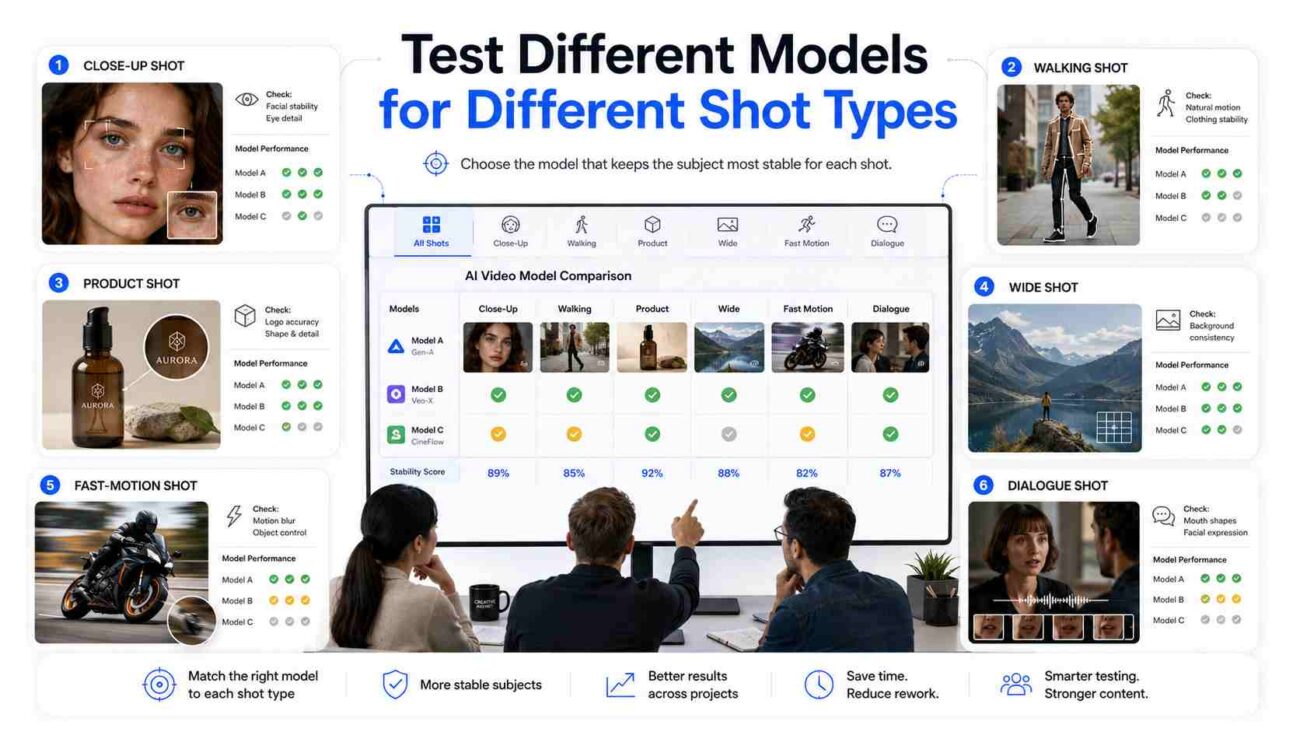
Not every video model performs the same way. Some are better at faces. Some are better at movement. Some handle landscapes well. Others are stronger for product shots or slow cinematic scenes.
Agencies should test models based on the shot type instead of using one model for everything.
Useful Testing Areas
| Shot Type | What to Check |
|---|---|
| Close-up face shot | Facial stability, eye detail, skin texture |
| Walking shot | Body movement, clothing stability, natural motion |
| Product shot | Logo clarity, shape accuracy, reflection control |
| Wide shot | Subject recognition, background consistency |
| Fast motion shot | Identity stability, motion blur, object control |
| Dialogue-style shot | Mouth shape, facial expression, he |
The goal is not always to choose the most cinematic model. Sometimes the best choice is the model that keeps the subject most stable.
Balance Image Strength and Motion
Most image-to-video tools include settings that control how strongly the final video follows the reference image. These settings may have names like image strength, motion control, reference strength, or motion level.
- Higher image strength usually keeps the video closer to the original reference. This helps with identity, but it can make movement look stiff.
- Lower image strength allows more motion and creativity. This can make the video feel more dynamic, but it may also increase identity drift.
Agencies need to test this balance for each project. A beauty ad may need stronger identity control. A sports-style video may need more motion. A luxury product video may need slower movement and higher detail stability.
Use Shot Planning to Hide Weaknesses
AI video still has limits, especially in long scenes. Instead of forcing the model to create one long perfect clip, agencies can plan around these limits.
A stronger edit may use:
- Shorter shots
- Cutaways
- Over-the-shoulder angles
- Product close-ups
- Hands and object details
- Environmental b-roll
- Slow camera movement
- Fewer fast turns or extreme gestures
This approach makes the final video feel smoother and more professional. It also reduces the number of moments where identity drift can become obvious.
Add a Post-Production Fixing Stage
AI video should not be treated as a one-click final product. For agency-level work, post-production is still important.
Small problems can often be fixed faster in editing software than by regenerating the same clip many times.
Post-production fixes may include:
- Color correction between shots
- Masking small visual errors
- Stabilizing shaky frames
- Fixing the logo or product details
- Removing unwanted artifacts
- Matching skin tone across scenes
- Smoothing transitions between clips
- Using blur or crop adjustments to hide weak frames
This final stage helps turn a good AI-generated draft into a cleaner commercial asset.
Create an Agency Checklist Before Delivery
Before sending a video to a client, the agency should review the project for consistency. A simple checklist can save time and avoid unnecessary revision rounds.
Consistency Checklist
- Does the subject look like the same person in every shot?
- Are the face, hair, and skin tone stable?
- Is the clothing consistent across scenes?
- Do accessories stay visible and accurate?
- Does the lighting match between clips?
- Are camera angles believable?
- Are logos, text, and product details stable?
- Are there any strange hand, eye, or mouth movements?
- Do transitions hide weak moments?
- Has the final edit been checked frame by frame?
This checklist is especially useful when multiple team members are working on the same campaign.
Set Realistic Client Expectations
One of the most important parts of an agency workflow is expectation management. Clients should understand that AI video can create strong results, but it still has technical limits.
A good way to explain it is simple:
AI video can produce around 90% of the result quickly, but the final 10% usually needs human review, editing, and correction.
This helps clients understand why planning, testing, and post-production still matter. It also prevents unrealistic expectations around perfect long-form consistency.
Conclusion
Maintaining subject integrity in AI video is not about finding a magic prompt. It requires a planned workflow built around visual anchors, stable prompt blocks, careful model selection, controlled motion settings, smart editing, and human post-production.
For agencies, the most reliable approach is to treat AI video like a production pipeline, not a random generation tool. Start with an approved subject image, use the same identity description across every shot, test different engines for different movements, and plan edits that protect continuity.
AI video is powerful, but consistency is what makes it usable for real client work. Agencies that build repeatable systems now will be better prepared to deliver professional, brand-safe video content as the technology continues to improve.