
Blog
End of One-Time Prompting: How to Build a Better AI Visual Workflow

For a long time, many people used AI image tools in a very simple way. They wrote one long prompt, clicked generate, and hoped the result would look good. Sometimes it worked well. Sometimes it failed badly.
This style of working can be fun for testing ideas, but it is not reliable for professional work.
A business, marketing team, content creator, or designer usually needs more than one lucky image. They need a clear process that can create useful visuals again and again. The image should match the brand, support the message, and be easy to improve when changes are needed.
That is why many creative teams are now moving away from one-time prompting. Instead of depending only on a prompt, they are building proper visual workflows. These workflows include idea testing, image editing, product placement, brand checks, human review, and final polishing.
The goal is simple. AI should not be used like a guessing game. It should become part of a clear creative system.
Why One-Time Prompting Is Not Enough Anymore
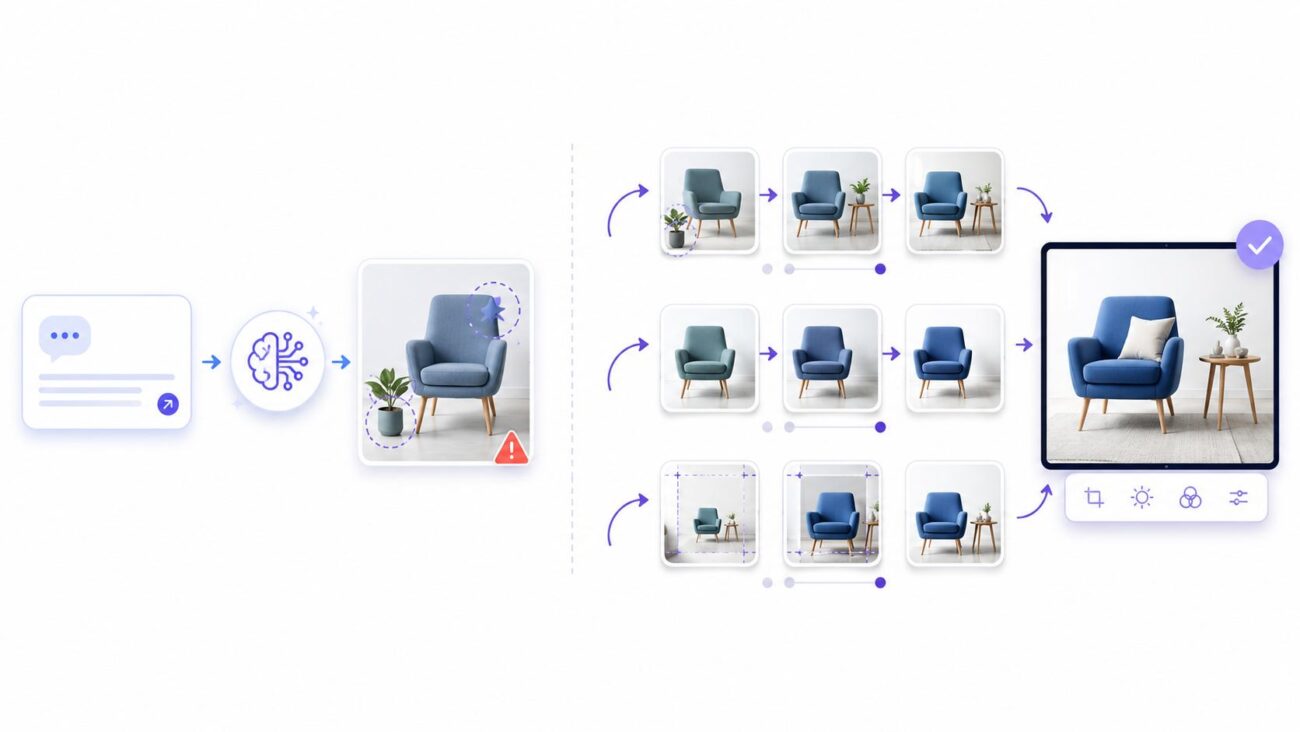
One-time prompting means writing a prompt and expecting the AI to create the final image in one try. This can work for simple ideas, but it becomes difficult when the work needs accuracy.
For example, a brand may need a product to appear in the right place, with the correct color, clean lighting, and a properly designed logo. When businesses create logos, they must also ensure these elements remain consistent across visuals. A single prompt often cannot control all of these details. If one part is correct, another part may change. If the background looks good, the product may look wrong. If the product looks right, the text may be unreadable.
This creates a problem for real production work. Teams waste time regenerating images again and again instead of improving one strong image in a controlled way.
| One Time Prompting Problem | Why It Creates Trouble | Better Way To Handle It |
|---|---|---|
| The result changes too much each time | Small edits can create a totally different image | Use editing tools where only one area changes |
| Brand details may be wrong | Logos, colors, and product shapes can change | Add brand elements manually after AI generation |
| It takes too long to fix small mistakes | The whole image may need to be generated again | Use a canvas editor and make targeted changes |
| The final result is hard to repeat | The same prompt may not create the same quality again | Build a step by step workflow |
| The team accepts average results | People stop improving because changes take too much time | Use fast drafts first, then refine the best option |
Main Difference Between Prompting And A Visual Pipeline
A prompt is only one instruction. A visual pipeline is a full process.
When you use only a prompt, you depend on the AI to understand everything at once. When you use a pipeline, you break the creative work into smaller stages. Each stage has a clear purpose.
This makes the work easier to manage. It also makes the final image more useful for real campaigns, websites, ads, social media posts, product pages, and client presentations.
| Workflow Stage | Main Purpose | What Happens In This Stage | Final Benefit |
|---|---|---|---|
| Idea testing | Explore different visual directions | Create quick rough images in different styles | Helps the team choose the best direction |
| Image selection | Pick the strongest concept | Compare layouts, mood, angle, and message | Saves time before detailed editing |
| Controlled editing | Fix or improve selected parts | Change background, objects, lighting, or placement | Gives better control than prompting alone |
| Brand polishing | Add correct brand elements | Insert logo, product image, color, font, and text | Keeps the image professional |
| Final review | Check quality before publishing | Look for mistakes in details, body shape, text, and product accuracy | Reduces risk and improves trust |
| Export and reuse | Prepare the final asset | Resize for website, ads, email, or social media | Makes the image ready for real use |
This process is more reliable than asking AI to create a perfect image from one prompt. It also helps teams work faster because they know what to do at each stage.
Speed Matters More Than Many People Think
In creative work, speed is not just about saving time. Speed also helps people think better.
When a designer or marketer can test many ideas quickly, they are more likely to find a strong concept. If each image takes too long to create, the team may stop after only a few attempts. That can lead to safe, boring, or weak results.
Fast image tools such as Nano Banana Pro can be useful during the early idea stage. At this point, the image does not need to be perfect. It only needs to show the direction clearly enough for the team to judge it.
For example, if a team is planning a social media campaign, they may want to test different backgrounds, camera angles, product placements, colors, and visual moods. A fast model can help create many options quickly. After the best idea is chosen, the team can spend more time improving that one direction.
| Creative Stage | What The Team Needs | Best Type Of AI Output |
|---|---|---|
| Early idea stage | Many quick visual options | Fast draft images |
| Campaign planning | Different layouts and angles | Rough but clear compositions |
| Client presentation | Clean and believable visuals | More polished images |
| Website banner creation | Strong layout and correct spacing | Refined image with human review |
| Final ad design | Accurate product, text, and brand details | AI base image plus manual editing |
This is why a smart workflow does not use one tool for everything. It uses fast generation for ideas, then editing and human review for the final result.
Why Canvas-Based Editing Is Better Than Prompt-Only Editing
A text prompt can describe an image, but it is not always good at making small changes.
For example, you may ask the AI to move a product slightly to the right. Instead of only moving the product, the AI may change the background, lighting, colors, or even the product itself. This is frustrating because a small change becomes a new problem.
Canvas-based editing helps solve this. It allows creators to work on the image like a real design file. They can select one part of the image, change that part, and keep the rest of the image stable.
This is very useful for business visuals.
| Task | Prompt Only Method | Canvas Editing Method |
|---|---|---|
| Change one object | The whole image may change | Only the selected area changes |
| Add a product | Product may look fake or incorrect | Product can be placed with more control |
| Fix background | AI may affect the main subject | Background can be edited separately |
| Improve lighting | Result may become inconsistent | Lighting can be adjusted in a focused way |
| Remove unwanted detail | AI may create new mistakes | Specific area can be cleaned |
Canvas editing makes AI more practical for real design work. It turns the image into something that can be improved step by step instead of being replaced again and again.
How Painting Helps With Product And Brand Images
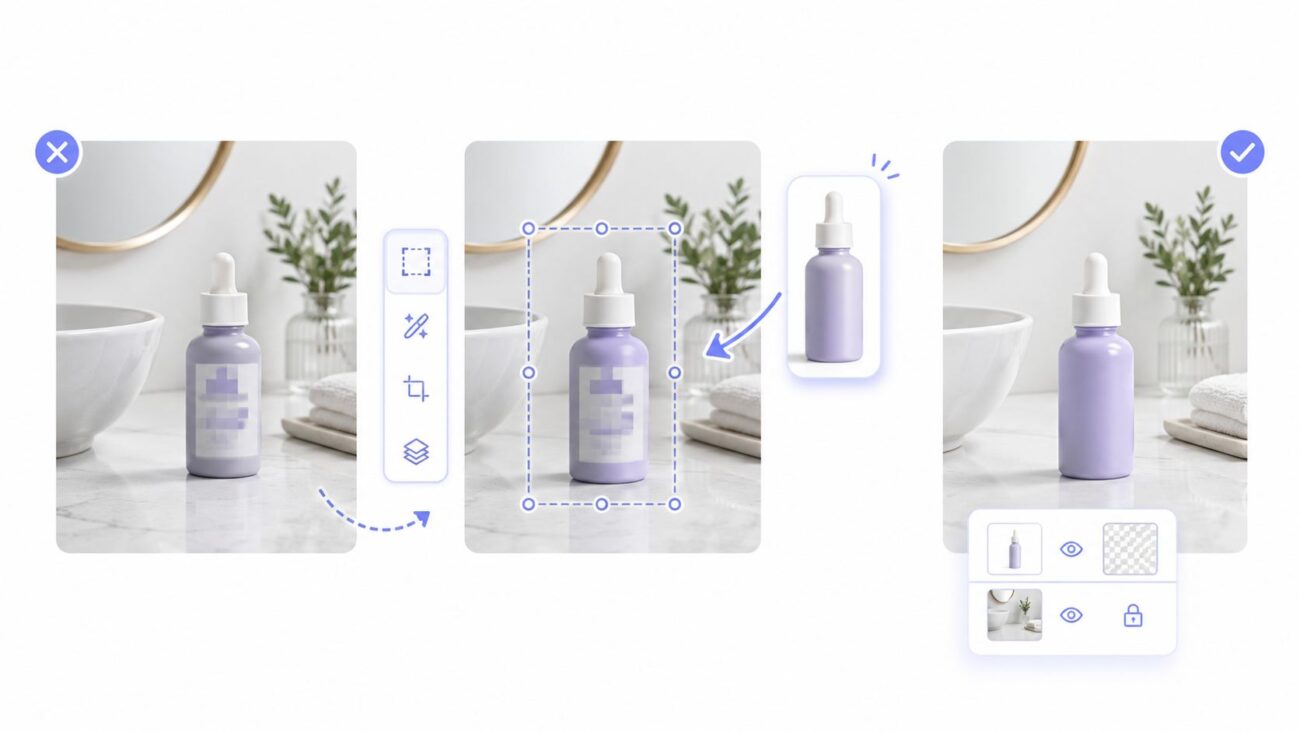
Painting means editing only a selected part of an image. This is one of the most useful methods for brands.
Imagine an ecommerce brand wants to show a skincare bottle on a bathroom counter. If the whole image is created from only a prompt, the bottle may look different from the real product. The label may change. The cap may look wrong. The color may not match. That is a serious problem because customers need to see the real product clearly.
A better process is to create the lifestyle scene first. Then the product area can be selected and edited with a real product reference. This gives the team more control and helps protect the product identity.
| Product Image Task | Recommended Workflow | Why It Works Better |
|---|---|---|
| Lifestyle product scene | Generate the room or background first | The setting can be creative without changing the product |
| Real product placement | Use a product reference image | Helps keep the product closer to reality |
| Background improvement | Edit only the background area | Keeps the main product safe |
| Ad image creation | Add brand text and logo manually | Ensures correct typography and branding |
| Final quality check | Review product shape, label, and shadows | Reduces mistakes before publishing |
The main idea is simple. Let AI create the mood and environment, but do not trust it unquestioningly with exact product details. Use human editing where accuracy matters.
Using Still Images As A Base For AI Video
Many creators now want to turn still images into short videos. This can be useful for ads, social media reels, product teasers, and website hero sections.
However, AI video is still not always stable. If the video starts with only text, the result may change too much. The subject may look different from frame to frame. The lighting may shift. The camera movement may feel strange.
A better way is to create a strong still image first. This image becomes the starting point for the video. It gives the video model a clear visual guide.
| Video Workflow Step | What To Do | Why It Helps |
|---|---|---|
| Create the main still image | Build the best first frame | Gives the video model a clear starting point |
| Fix the image before animation | Correct product, lighting, and composition | Prevents mistakes from moving into the video |
| Generate short motion clips | Keep movement simple and controlled | Reduces strange or unstable results |
| Choose the best clip | Compare several versions | Helps avoid using weak motion |
| Edit in video software | Add text, music, cuts, and brand elements | Makes the final video more professional |
This method is more reliable than asking AI to create a full video from a simple text prompt. It gives creators more control from the beginning.
Still, AI video should be treated carefully. It may take several tries to get a useful motion. A professional workflow should expect testing, reviewing, and editing.
Where AI Still Needs Human Help
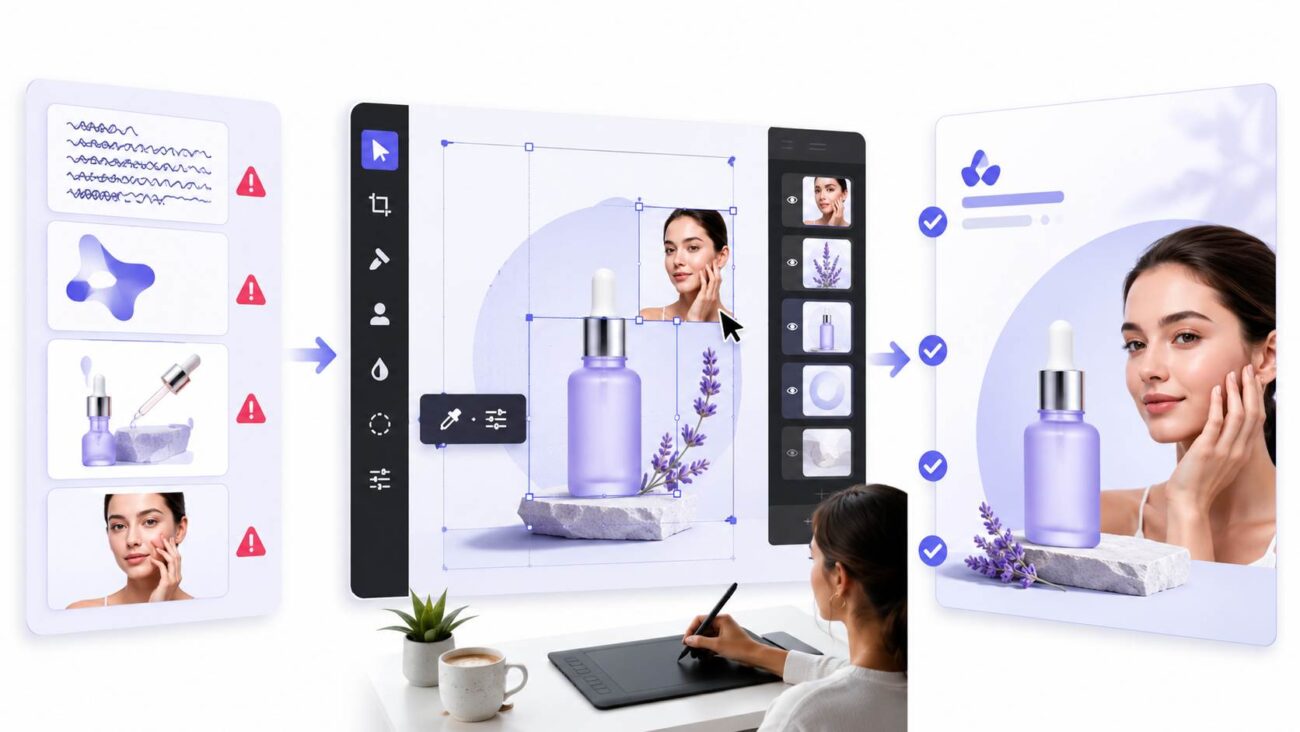
AI image tools are powerful, but they are not perfect. A good creative team understands where AI is useful and where human editing is still needed.
One major issue is text. AI often struggles with exact letters, clean words, and brand fonts. If a banner, ad, or poster needs readable text, it is usually better to add the text manually in a design tool.
Logos are another important area. AI should not recreate a brand logo because it may become distorted. The correct logo file should be added after the image is generated.
Human bodies can also be a problem. Hands, fingers, faces, and complex poses can sometimes look unnatural. This is especially common when the scene has movement, many people, or difficult angles. Even the best AI graphics generator can occasionally produce visual errors that require manual adjustments to achieve a polished, professional result.
| Area Where AI Struggles | Common Problem | Best Human Solution |
|---|---|---|
| Text in images | Words may look broken or unreadable | Add text manually in design software |
| Brand logos | Logo shape may change | Use the official logo file |
| Product accuracy | Product may look different from the real item | Use reference images and manual correction |
| Hands and body poses | Fingers or limbs may look strange | Regenerate or edit carefully |
| Legal and brand safety | Output may not be fully safe for public use | Review before publishing |
| Final polish | Image may look good but not complete | Let a designer finish spacing, color, and layout |
AI should be seen as a creative assistant, not a final approval system. It can help create strong starting points, but people still need to check the final result.
A Simple AI Visual Workflow For Creative Teams
A useful workflow should be easy for a team to follow. It should not feel confusing or too technical.
The process can start with a short creative brief. This brief should explain the image goal, target audience, product, mood, platform, and brand style. Once the brief is clear, the team can create several rough options using a fast AI model.
After that, the best option should be selected and improved in an editor. The team can adjust the background, product placement, lighting, and composition. Then brand elements such as logo, text, and exact colors can be added manually.
Before publishing, the final image should be reviewed carefully.
| Workflow Phase | Question To Ask | Good Result Looks Like |
|---|---|---|
| Brief | What is this image supposed to do | The purpose is clear |
| Idea generation | Which visual direction feels strongest | Several useful options are created |
| Selection | Which image best supports the message | One clear direction is chosen |
| Editing | What needs to be fixed or improved | The image becomes cleaner and more controlled |
| Branding | Does it match our brand style | Logo, color, and text are correct |
| Review | Is anything wrong or misleading | Mistakes are removed |
| Export | Where will this image be used | Correct size and format are prepared |
This type of workflow helps avoid random results. It gives the team a repeatable process that can be used for future campaigns too.
How To Measure If Your AI Workflow Is Working
A good AI workflow should save time, improve quality, and reduce stress. It should not make the team jump between too many tools or fix the same mistakes again and again.
Creative teams can measure success by looking at practical things. They should ask how quickly they can move from idea to final image, how many useful options they can create, and how often the final image needs heavy correction.
| Metric | What It Means | Why It Matters |
|---|---|---|
| Idea to final time | Time from brief to finished asset | Shows if the workflow is saving time |
| Useful image rate | Number of images that are actually usable | Shows if prompts and tools are working well |
| Revision time | Time spent fixing each image | Shows how much control the team has |
| Brand accuracy | How close the image is to brand rules | Protects trust and consistency |
| Tool switching | Number of tools used for one image | Too many tools can slow the team down |
| Team confidence | How comfortable people feel using the process | A good workflow should feel clear and repeatable |
The best workflow is not always the one that creates the most beautiful first result. The best workflow is the one that helps a team create useful, correct, and publish-ready visuals with less wasted effort.
Practical Tips For Better AI Visual Production
A team should not begin by asking AI for a perfect final image. It is better to start with a clear goal and build the image in stages.
The prompt should describe the scene, mood, subject, lighting, and platform. However, exact brand details should be handled carefully. If a product, logo, or text must be accurate, it should be added or checked by a human.
Teams should also save strong prompts, good reference images, and useful editing settings. Over time, this creates an internal system that makes future work faster.
| Practical Tip | Why It Helps |
|---|---|
| Start with a clear brief | Reduces confusion before generation |
| Create many rough options first | Helps find stronger ideas |
| Do not rely on AI for exact text | Prevents unreadable or wrong words |
| Use real product references | Improves product accuracy |
| Edit selected areas instead of regenerating everything | Saves time and keeps the image stable |
| Add final branding manually | Protects logo, font, and color accuracy |
| Review before publishing | Catches visual and legal problems |
| Save successful workflows | Makes future projects easier |
This approach makes AI more useful for real creative work. It also helps teams avoid the trap of chasing perfect prompts without a plan.
Final Thoughts
The future of AI image creation is not about writing longer and more complicated prompts. It is about building better workflows.
One-time prompting can still be useful for quick ideas, but it is not enough for serious creative production. Brands and teams need more control, better editing, stronger review, and a process they can repeat.
Fast AI tools can help with early ideas. Canvas editors can help improve selected images. Human designers can protect brand quality, fix details, and prepare final assets for real use.
In the end, AI works best when it supports human creativity. It should help teams move faster, test more ideas, and create better starting points. The final direction, brand message, and quality control should still come from people.
A strong visual pipeline turns AI from a guessing tool into a practical part of the creative process.