
Gaming in Small Spaces: Building the Ultimate Setup in a Shared Apartment


Living in a shared apartment often means learning how to balance personal interests with limited space and the needs of others. For gamers, this can present a unique challenge. A great gaming setup typically calls for comfort, performance, and immersion, three things that can feel difficult to achieve when your living environment is compact and shared.
The good news is that creating a functional and enjoyable gaming space doesn’t require a dedicated room or expansive square footage. With thoughtful planning, the right equipment choices, and a bit of creativity, it’s entirely possible to build a setup that fits easily into your shared living arrangement. This guide explores practical ways to optimize your gaming experience without disrupting your household dynamic.
Understanding Your Space and Setting Boundaries
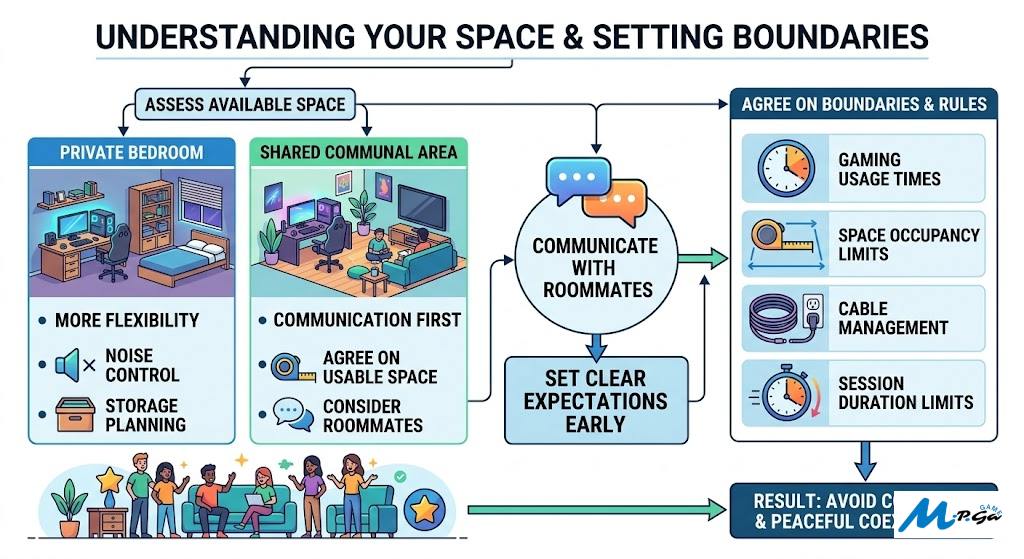
Before investing in equipment or rearranging furniture, take a step back and assess your available space. In a shared apartment, your gaming setup will likely live in your bedroom or a designated corner of a communal area. Each option comes with its own considerations.
If your setup is in a private room, you have more flexibility, but you still need to be mindful of noise and storage. If you’re using a shared space, communication is essential. Discuss your plans with roommates and agree on boundaries, such as when the area will be used for gaming and how much space you can reasonably occupy.
Clear expectations early on help avoid conflicts later. Even small decisions, like where cables run or how long a gaming session lasts, can affect others in close quarters.
Choosing Compact and Multi-Functional Equipment
When space is limited, every item in your setup should serve a purpose. Bulky desks and oversized chairs can quickly make a room feel cramped, so it’s worth prioritizing compact, multi-functional furniture.
A wall-mounted desk or foldable table can provide a stable gaming surface without permanently taking up space. Similarly, consider a chair that offers ergonomic support but can be tucked away when not in use. For hardware, smaller form-factor PCs or gaming laptops are ideal, especially if portability is important.
Storage also plays a big role. Use vertical shelving or under-desk organizers to keep accessories, controllers, and cables tidy. This improves the look of your setup while also making it easier to transition between gaming and everyday life.
Managing Noise and Maintaining Harmony
Noise is one of the biggest concerns in shared living environments, especially for gamers who enjoy immersive audio or late-night sessions. Headphones are an obvious solution, but not all headphones are functional enough. Investing in a quality pair with good sound isolation can significantly improve your experience while keeping things quiet for others.
Mechanical keyboards and cooling fans can also generate noise. If you’re sensitive to your roommates’ comfort, consider quieter alternatives such as membrane keyboards or low-noise components. Simple adjustments like adding a desk mat can help dampen sound as well.
Being mindful of timing is just as important. Even the best equipment won’t compensate for inconsiderate habits. Establish a routine that respects shared schedules, especially if others are working, studying, or sleeping.
Finding the Right Living Situation for Your Lifestyle
A well-designed gaming setup is only part of the equation. Your overall living environment plays a significant role in how comfortably you can pursue your hobbies. Not all shared apartments will offer this comfort, and finding compatible roommates can make a noticeable difference.
This is where platforms like SpareRoom come into the picture. Designed to connect people seeking shared accommodation, SpareRoom allows users to search by personal preferences, making it easier to find living arrangements that align with individual lifestyles.
For gamers in particular, compatibility matters. If you prefer a quiet household or live with others who share similar interests, the ability to filter and choose what matters most can help you settle into a space where your setup feels welcome.
If you’re planning a move to big cities or looking to upgrade your current situation, taking the time to find roommates in NYC who align with your habits can make building and maintaining your gaming setup far more enjoyable.
Optimizing Lighting and Visual Comfort
Lighting often gets overlooked, but it has a significant impact on both performance and comfort. In small spaces, harsh overhead lighting or poor screen placement can lead to eye strain and fatigue.
Start by positioning your monitor to reduce glare from windows or ceiling lights. Adjustable desk lamps or LED strips can provide focused lighting without overwhelming the room. Many gamers also incorporate ambient lighting behind their monitors to create a softer viewing environment.
In shared apartments, lighting choices can also influence the overall atmosphere. Subtle, well-placed lighting can help your setup blend into the room rather than dominate it, which is especially important in communal areas.
Balancing Gaming With Shared Living
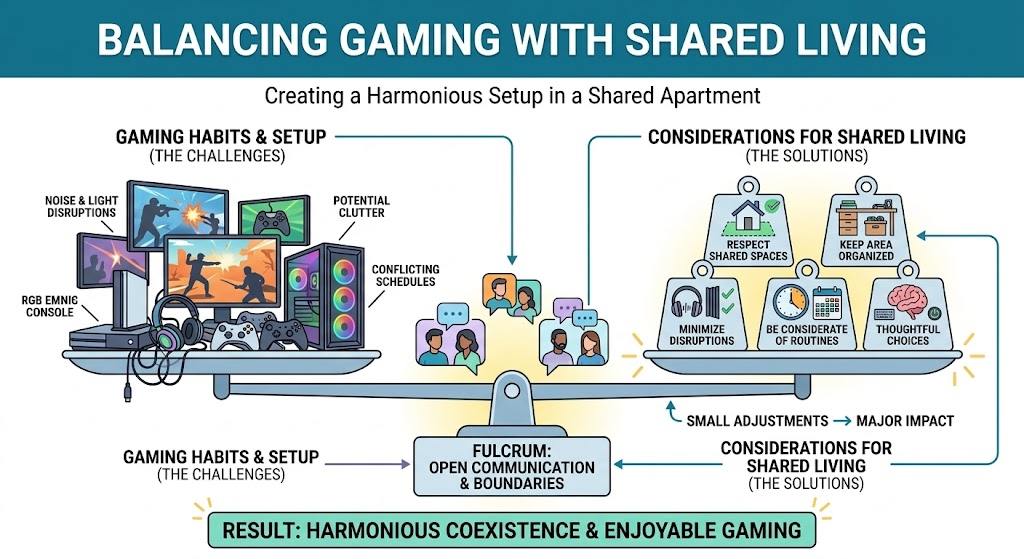
Creating the ultimate gaming setup in a shared apartment is about balance. Respecting shared spaces, communicating openly, and making thoughtful choices all contribute to a more harmonious living environment.
Small adjustments can have a major impact. Keeping your area organized, minimizing disruptions, and being considerate of others’ routines help ensure that your gaming habits coexist comfortably with shared living.
Conclusion
Gaming in a small, shared apartment doesn’t mean compromising on quality or enjoyment. With the right approach, you can build a setup that fits your space, supports your lifestyle, and respects the people around you.
By choosing compact equipment to manage noise and finding compatible roommates, you can shape your experience and create a gaming environment that feels personal and functional, no matter how limited your space may be.