
Designing for Trust: Role of UI/UX in Building Credibility Online


Users form trust or break it within seconds of landing on your product. Interface design, interaction patterns, and visual quality all work together to signal credibility, reduce friction, and turn cautious visitors into confident customers.
Why Trust Is the Foundation of Digital Success

Trust is not a nice-to-have feature. It is the invisible foundation on which every successful digital product is built. Without it, even the most advanced or feature-rich product will struggle to keep users engaged, convert visitors into customers, or build long-term loyalty.
When users land on your platform, they are not just exploring features. They are making a quick judgment about whether your product feels safe, reliable, and worth their time. This decision happens almost instantly, often before they read any detailed content.
Every element of your design plays a role in shaping that perception. From layout and colors to loading speed and messaging, each detail either builds confidence or creates doubt. Even small inconsistencies can make users hesitate. This is especially true in custom software, where users expect a seamless and tailored experience that aligns with their specific needs and workflows.
Trust influences behavior across the entire user journey. It determines whether users stay or leave, whether they sign up or abandon the process, and whether they return or choose a competitor. A strong sense of trust reduces friction and makes interactions feel effortless.
When Trust Is Present
When users feel confident in your product, their behavior becomes more positive and engaged:
- Users explore more freely and spend more time on your platform
- Willingness to share personal information increases
- Purchase decisions happen faster with less hesitation
- Users are more likely to recommend your product to others
- They show greater patience if minor issues occur
Trust creates a smooth and comfortable experience where users feel in control and understood.
When Trust Is Broken
When trust is missing or damaged, even a good product can fail:
- Users leave before fully understanding your value
- Bounce rates increase regardless of marketing efforts
- Customers abandon carts during checkout
- Negative reviews shape public perception
- Fixing trust issues becomes more expensive than preventing them
Once trust is lost, it is difficult to recover. Users rarely give a second chance to a product that feels unreliable or confusing.
Building trust early and maintaining it consistently is what separates successful digital products from those that struggle to grow.
Psychology of Trust in Interface Design
Users do not consciously analyze design. Their brains quickly compare what they see with past experiences. This automatic processing means trust decisions happen before logical thinking begins.
| Concept | Explanation |
|---|---|
| The Halo Effect in Digital Design | A strong first impression in design makes users assume the product is reliable and secure. A poor design does the opposite and creates doubt across the entire experience. |
| Familiarity as a Trust Signal | Users feel comfortable when interfaces follow known patterns. Navigation in expected places and familiar icons reduce effort and increase confidence. Too much novelty without guidance creates confusion. |
Key Trust Factors in Design
| Trust Factor | What Users Perceive | Design Implication | Impact Level |
|---|---|---|---|
| Visual Quality | This company is professional | High-quality visuals and consistent layout | High |
| Clarity | I understand what to do next | Clear headlines and focused actions | High |
| Consistency | This feels reliable | Repeated patterns and a unified design system | High |
| Feedback | The system responds to me | Loading states and confirmations | Medium |
| Transparency | Nothing is hidden | Clear pricing and policies | High |
| Performance | This works smoothly | Fast load times and a stable experience | High |
| Familiarity | I know how to use this | Follow common UX patterns | Medium |
UI Design Elements That Build Credibility
| Concept | Explanation |
|---|---|
| Visual Hierarchy and Layout Structure | A structured layout helps users quickly understand content and actions. Clear hierarchy reduces confusion and builds confidence. |
| Typography as a Trust Carrier | Typography affects readability and perception. Consistent fonts, proper spacing, and readable sizes create a polished and reliable experience. |
| Color Psychology and Semantic Use | Colors influence emotions and meaning: Blue signals trust and reliability, Green represents success and safety, and Red highlights warnings or errors. Consistency in color usage is essential to avoid confusion. |
| Consistent Component Design | Buttons, forms, and elements should look and behave the same across the product. Consistency reduces learning time and increases comfort. |
| Intentional Use of Whitespace | Whitespace improves readability and creates a clean, premium feel. Crowded layouts create pressure and reduce trust. |
UX Principles That Deepen User Confidence
| Concept | Key Points |
|---|---|
| Navigation That Matches User Expectations | Use simple and clear labels; limit menu complexity; provide easy back navigation; avoid internal jargon. |
| Feedback Loops and System Communication | Ensure the system communicates clearly with users through responses and guidance. |
| Immediate Response Feedback | Buttons and actions show instant response to confirm the system is working. |
| Progress Indicators | Show steps in multi-stage processes to help users understand progress. |
| Success and Error Messages | Confirm actions clearly and provide helpful explanations when errors occur. |
| Undo and Recovery Options | Allow users to fix mistakes easily and regain control. |
| Onboarding That Reduces Friction | Focus on essential actions first; introduce features gradually; use tooltips instead of long instructions; help users achieve early success. |
| Accessibility as a Trust Signal | Accessible design shows care for all users and increases reliability. |
| Accessibility Practices | Good color contrast; keyboard navigation; screen reader support; inclusive experiences that build trust. |
Common UX Failures That Destroy Trust
| Issue | Explanation |
|---|---|
| Dark Patterns and Manipulation | Hidden options and misleading choices reduce credibility and make users feel manipulated. |
| Surprise Costs and Hidden Information | Unexpected fees or unclear pricing damage trust instantly. |
| Poor Mobile Experience | Unoptimized mobile design signals neglect and creates frustration for users. |
| Broken Pages and Errors | Missing pages or system bugs reduce confidence in the product. |
| Slow Loading Performance | Users often leave if pages take too long to load. |
| Aggressive Interruptions | Early popups and forced actions interrupt the experience and frustrate users. |
Trust Signals That Reassure Users
| Trust Element | Key Details |
|---|---|
| Social Proof and User Evidence | Real reviews and testimonials; case studies with clear results; recognizable client logos. |
| Security and Privacy Communication | Visible security indicators; clear privacy policies; transparent explanations of how user data is used. |
| Accessible Support Options | Easy-to-find contact information; live chat or email support for assistance. |
| Transparent Policies | Clear return and cancellation policies with no hidden terms. |
Link Between Trust and Business Outcomes
| UX Improvement | Business Impact | Reason |
|---|---|---|
| Transparent Checkout | 35–40% fewer abandonments | Reduces friction |
| Faster Load Time | Up to 70% lower bounce rate | Signals reliability |
| Reviews Near CTA | 15–30% higher conversions | Builds confidence |
| Mobile-First Design | 40–60% more engagement | Matches user behavior |
| Clear Error Messages | Fewer support requests | Reduces confusion |
| Accessible Design | Wider audience reach | Improves usability |
Building Trust Into Every Stage of Product Development
Trust should not be treated as a final layer added after a product is built. It needs to be embedded into every stage of development, from early research to long-term maintenance. When trust is considered early, it reduces costly fixes later and creates a smoother, more reliable user experience from the start.
Discovery and Research
This is where trust begins. Before designing anything, you need to understand what your users expect and what makes them hesitate.
- Identify user concerns
- Understand trust barriers
- Map critical moments in the journey
Go deeper by conducting user interviews, surveys, and competitor analysis. Look at what users complain about in similar products. Pay attention to emotional triggers such as fear of losing money, confusion about pricing, or concerns about data privacy. These insights help you design experiences that directly address user doubts instead of guessing them.
Design and Prototyping
Design is where trust becomes visible. Every visual and interaction decision should aim to reduce confusion and build clarity.
- Build a consistent design system
- Define UI patterns and behaviors
- Plan feedback and error handling
At this stage, create wireframes and prototypes that focus on clarity rather than decoration. Ensure that layouts are clean, actions are obvious, and flows feel natural. Include clear call-to-actions, predictable navigation, and strong visual hierarchy. Testing prototypes with real users can reveal early trust issues before development begins.
Development and Testing
Even the best design can fail if execution is poor. Development plays a critical role in maintaining trust through performance and reliability.
- Fix UI issues as a priority
- Ensure performance optimization
- Test across devices and screen sizes
Small bugs, slow loading times, or broken elements immediately damage credibility. Treat these issues as serious problems, not minor flaws. Also, ensure smooth animations, fast response times, and proper handling of edge cases like errors or empty states. Consistency between design and development is key to maintaining user confidence.
Post Launch Optimization
Trust building does not stop at launch. Real users will interact with your product in ways you did not expect.
- Analyze user behavior
- Run A/B tests on trust elements
- Improve high-risk areas
Use analytics tools, heatmaps, and session recordings to identify where users hesitate or drop off. Test variations of key elements like CTAs, testimonials, and pricing displays. Focus especially on high-impact areas such as sign-up flows, checkout pages, and onboarding screens.
Ongoing Maintenance
Trust can fade over time if a product is not maintained properly. Regular updates are essential to keep the experience reliable and relevant.
- Update outdated content
- Fix broken links
- Refresh trust signals regularly
Keep your product fresh by updating visuals, removing outdated information, and ensuring all features work as expected. Even small details like an old copyright date or inactive links can make users question your credibility.
Case for Custom UX Solutions
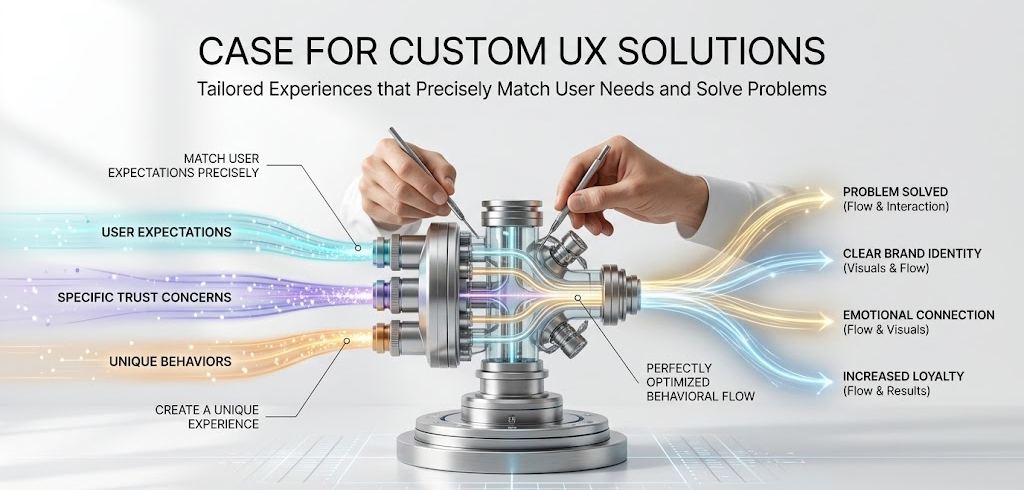
Template-based designs offer speed and convenience, but they often fail to address the unique needs of your audience. When users see the same layouts and patterns across multiple platforms, it becomes harder for your product to stand out or feel trustworthy.
Custom UX focuses on building an experience specifically for your users and their expectations.
- Match user expectations precisely
- Address specific trust concerns
- Create a unique experience
- Build long-term user confidence
A tailored approach allows you to design flows, visuals, and interactions that directly solve your users’ problems. It also helps you communicate your brand identity more clearly. Over time, this creates a stronger emotional connection and increases user loyalty.
A Trust Audit Checklist
Regularly reviewing your product through a trust-focused lens helps you identify gaps and opportunities for improvement. This checklist can guide your evaluation process.
Visual and Interface
Your interface is the first impression users get. It should immediately communicate professionalism and clarity.
- Consistent design system
- High-quality imagery
- Readable typography
- Strong color contrast
- Loading states for actions
- Informative empty states
- Helpful error messages
Also review spacing, alignment, and responsiveness. A clean and organized layout reduces cognitive load and makes users feel comfortable navigating your product.
Content and Trust Signals
Content plays a major role in reducing uncertainty and answering user questions.
- Clear pricing before sign-up
- Simple privacy policy
- Real user reviews near CTAs
- Easy access to support
- Visible security indicators
- No dark patterns
- Fully optimized mobile experience
In addition, ensure your messaging is clear and honest. Avoid vague claims or overly complex language. Users should understand exactly what they are getting and what to expect.
By integrating trust into every stage of development and continuously refining your product, you create an experience that feels reliable, transparent, and user-focused. This not only improves conversions but also builds long-term relationships with your audience.
Final Thoughts
Trust is the most valuable advantage a digital product can build. Features can be copied, and pricing can be matched, but a trustworthy experience is much harder to replicate.
When users feel confident using your product, they are more likely to stay, engage, and return. This confidence does not come from a single feature. It is built through consistent, thoughtful design decisions that make users feel safe, understood, and in control.
Every improvement in UI and UX strengthens the relationship between your product and its users. That relationship directly impacts retention, conversions, and long-term growth. Small changes like clearer messaging, faster load times, or better feedback can have a significant effect on how users perceive your product.
The best approach is to start small and stay consistent. Focus on one part of your product at a time. Identify areas where users might feel uncertain or frustrated, and improve them step by step. Over time, these improvements compound and create a seamless, trustworthy experience.
Trust is not built overnight. It grows gradually with every positive interaction a user has with your product. Once established, it becomes your strongest and most sustainable asset.